> For the complete documentation index, see [llms.txt](https://docs.tronsave.io/llms.txt). Markdown versions of documentation pages are available by appending `.md` to page URLs; this page is available as [Markdown](https://docs.tronsave.io/chinese/developers/authentication.md).
# 身份认证
说明 TronSave API 的两种身份验证方式:绑定内部账户的 API 密钥与完全自托管的签名交易,并演示如何在网站或 Telegram 上获取、撤销和轮换你的 API 密钥。
每个 TronSave API 请求都必须经过身份验证。有两种方式:与 TronSave **内部账户**绑定的 **API 密钥**,或者**签名交易**(即每次购买时从你自己的钱包付款)。本页将说明这两种方式,并展示如何在网站上或通过 Telegram 获取 API 密钥。
## 内部账户和 API 密钥
TronSave **内部账户**是由 TronSave 管理的余额。你只需向其中存入一次 TRX,之后当你下单时,API 会自动从该余额中扣款。它还会记录你的交易历史,并让你在系统内管理资产。
每个内部账户都会分配一个唯一的 **API 密钥**——这是由 TronSave 发放并关联到该账户的一个秘密标识符。API 密钥让你或第三方应用(机器人、自动化服务)无需登录网站或应用即可向内部账户发送指令。每个请求——查询余额、创建订单、延长订单——都通过 API 密钥与内部账户关联。
简而言之:
* **内部账户**是存储和管理你资产的地方。
* **API 密钥**是授予对该账户进行安全、自动化访问的工具。
{% hint style="warning" %}
你的 API 密钥控制着从内部账户中的支出。请像对待密码一样对待它:切勿将其提交到源代码管理中,切勿在客户端代码中暴露它,也切勿分享它。任何持有你密钥的人都可以下单,花费你存入的 TRX。
{% endhint %}
## 两种身份验证方式
| | API 密钥 | 签名交易 |
| -------- | ---------------------------- | ------------------------ |
| **工作原理** | 请求携带你的 API 密钥;订单从你的内部账户余额中支付 | 每次购买时,你从自己的钱包签名一笔 TRX 付款 |
| **托管方式** | 资金保存在由 TronSave 管理的内部账户中 | 完全自托管——资金由你自己保管 |
| **设置** | 获取 API 密钥,存入一次 TRX | 无需存款;每笔交易单独签名 |
| **适用场景** | 频繁调用的机器人和自动化服务 | 希望保留资金托管权并按需付款的用户 |
| **发送方式** | `apikey` 请求头 | 请求体中的一笔签名交易 |
{% hint style="info" %}
使用 API 密钥方式时,你在 `apikey` 请求头中发送密钥:
```bash
curl -X POST https://api.tronsave.io/v2/buy-resource \
-H "apikey: YOUR_API_KEY" -H "Content-Type: application/json" \
-d '{ ... }'
```
{% endhint %}
关于此处使用的术语,请参阅[术语表](/chinese/concepts/glossary.md)。
## 获取 API 密钥
你可以直接从**网站**或通过 **Telegram** 获取 API 密钥。
{% tabs %}
{% tab title="在网站上" %}
**第 1 步 — 获取存款地址和 API 密钥**
1. 前往 [tronsave.io](https://tronsave.io/market)。
2. 点击 **Connect** 按钮。
3. 选择一个钱包选项并登录以连接。
4. 连接后,选择 **Account info**。
5. 点击 **Login TRONSAVE** 按钮并 **Sign**(签名)。
6. 你的 API 密钥和存款地址将会显示出来。
{% hint style="info" %}
**注意:** 如果你使用的是 **Nile 测试网**,请改用此 URL:[`https://testnet.tronsave.io/`](https://testnet.tronsave.io/)
{% endhint %}
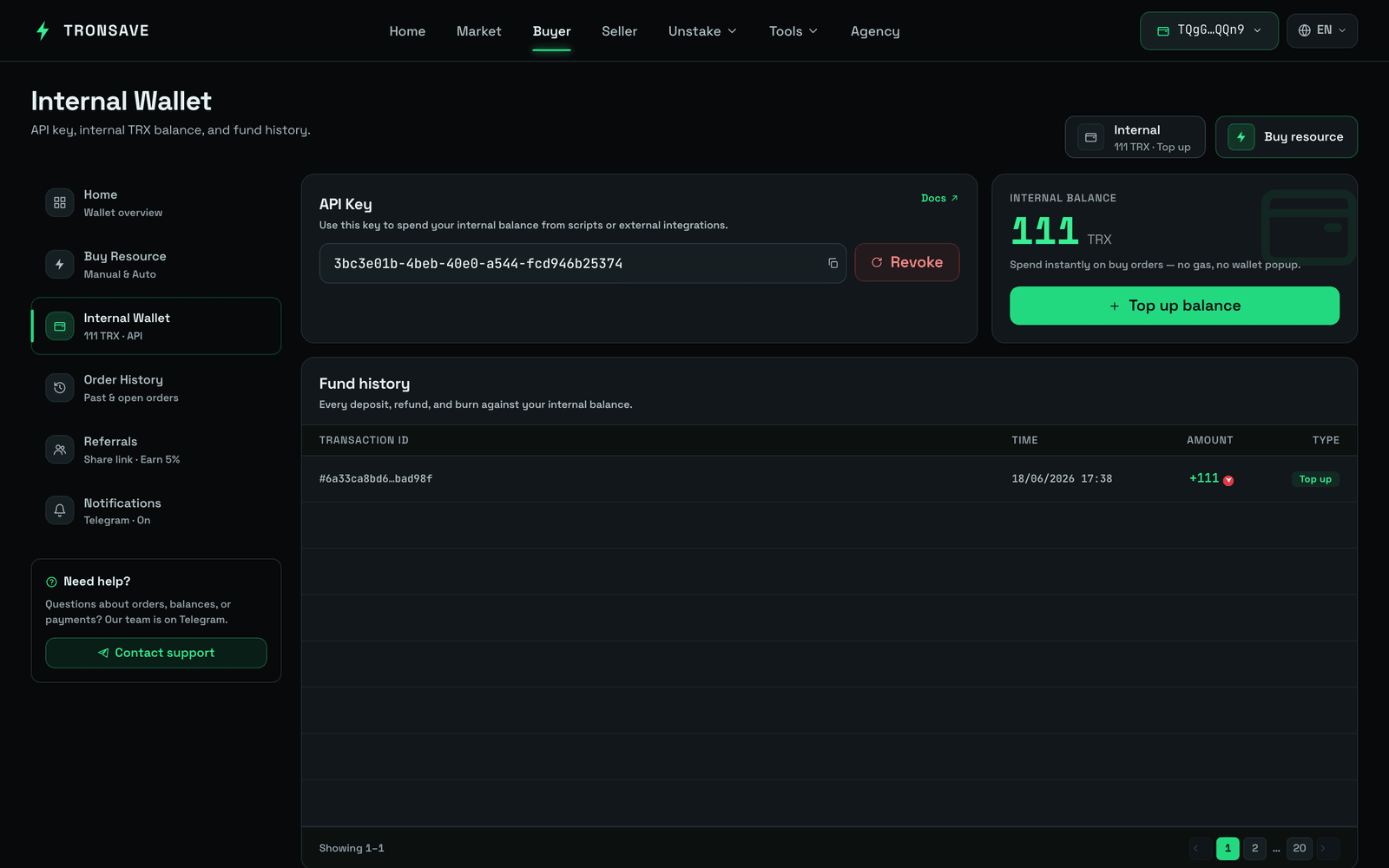 **第 2 步 — 通过转入 TRX 进行存款**
1. 点击 **Top up** 按钮以获取存款地址。
2. 将 TRX 转入此地址。
3. **Sign**(签名)以确认交易。
4. 新余额会在大约 3 秒内自动更新。
{% hint style="info" %}
* 最低存款额为 **10 TRX**。
* 你的首次存款需要额外支付约 **1 TRX** 的费用以激活新地址。
* 每天你可以进行 **2 笔** TRX 存款交易而无需手续费。超过之后,每笔额外的存款将产生 **0.3 TRX** 的手续费。
{% endhint %}
{% endtab %}
{% tab title="在 Telegram 上" %}
1. 打开 TronSave Telegram 机器人([@BuyEnergyTronsave\_bot](https://t.me/BuyEnergyTronsave_bot))并进入 **User Info**。
2. 选择 **API key** 按钮。
3. 点击 API 密钥即可复制它。
**第 2 步 — 通过转入 TRX 进行存款**
1. 点击 **Top up** 按钮以获取存款地址。
2. 将 TRX 转入此地址。
3. **Sign**(签名)以确认交易。
4. 新余额会在大约 3 秒内自动更新。
{% hint style="info" %}
* 最低存款额为 **10 TRX**。
* 你的首次存款需要额外支付约 **1 TRX** 的费用以激活新地址。
* 每天你可以进行 **2 笔** TRX 存款交易而无需手续费。超过之后,每笔额外的存款将产生 **0.3 TRX** 的手续费。
{% endhint %}
{% endtab %}
{% tab title="在 Telegram 上" %}
1. 打开 TronSave Telegram 机器人([@BuyEnergyTronsave\_bot](https://t.me/BuyEnergyTronsave_bot))并进入 **User Info**。
2. 选择 **API key** 按钮。
3. 点击 API 密钥即可复制它。
 {% endtab %}
{% endtabs %}
## 撤销和轮换你的密钥
如果你需要更改 API 密钥,请选择 **Revoke**(撤销)以生成一个新密钥。在网站和 Telegram 上的操作方式相同:确认操作以创建新密钥,或取消以保留当前密钥。
{% hint style="warning" %}
我们不建议更改 API 密钥。撤销会使旧密钥失效——任何仍在使用它的机器人或服务都将停止工作。仅在必要时才进行撤销(例如,密钥可能已被泄露)。
{% endhint %}
## 后续步骤
* [开发者快速开始](/chinese/developers/quickstart.md) — 获取密钥、存款并下你的第一个订单
* [API 参考](/chinese/developers/api-reference.md) — 完整的端点列表
* [术语表](/chinese/concepts/glossary.md) · [订单类型](/chinese/concepts/order-types.md)
{% endtab %}
{% endtabs %}
## 撤销和轮换你的密钥
如果你需要更改 API 密钥,请选择 **Revoke**(撤销)以生成一个新密钥。在网站和 Telegram 上的操作方式相同:确认操作以创建新密钥,或取消以保留当前密钥。
{% hint style="warning" %}
我们不建议更改 API 密钥。撤销会使旧密钥失效——任何仍在使用它的机器人或服务都将停止工作。仅在必要时才进行撤销(例如,密钥可能已被泄露)。
{% endhint %}
## 后续步骤
* [开发者快速开始](/chinese/developers/quickstart.md) — 获取密钥、存款并下你的第一个订单
* [API 参考](/chinese/developers/api-reference.md) — 完整的端点列表
* [术语表](/chinese/concepts/glossary.md) · [订单类型](/chinese/concepts/order-types.md)