> For the complete documentation index, see [llms.txt](https://docs.tronsave.io/llms.txt). Markdown versions of documentation pages are available by appending `.md` to page URLs; this page is available as [Markdown](https://docs.tronsave.io/chinese/guides/buy/auto-buy.md).
# 自动购买
一次设置规则,让 TronSave 在目标地址的能量或带宽低于阈值时自动为其补充资源。
**自动购买**会自动为目标地址购买能量或带宽。无需手动创建购买订单,TronSave 会根据你一次性配置的规则为你下单,让目标地址永远不会耗尽资源。
{% hint style="info" %}
自动购买从你的**内部账户**余额中扣款,而不是直接从你连接的钱包中扣款。开始之前请先为内部账户充值。关于内部账户的工作原理,请参阅[价格与 APY](/chinese/concepts/pricing-and-apy.md)以及更全面的[订单类型](/chinese/concepts/order-types.md)概述。
{% endhint %}
## 设置自动购买规则
### 第 1 步 — 连接钱包
在 [tronsave.io](https://tronsave.io/dashboard/buyer/buy-resource) 连接你的钱包。
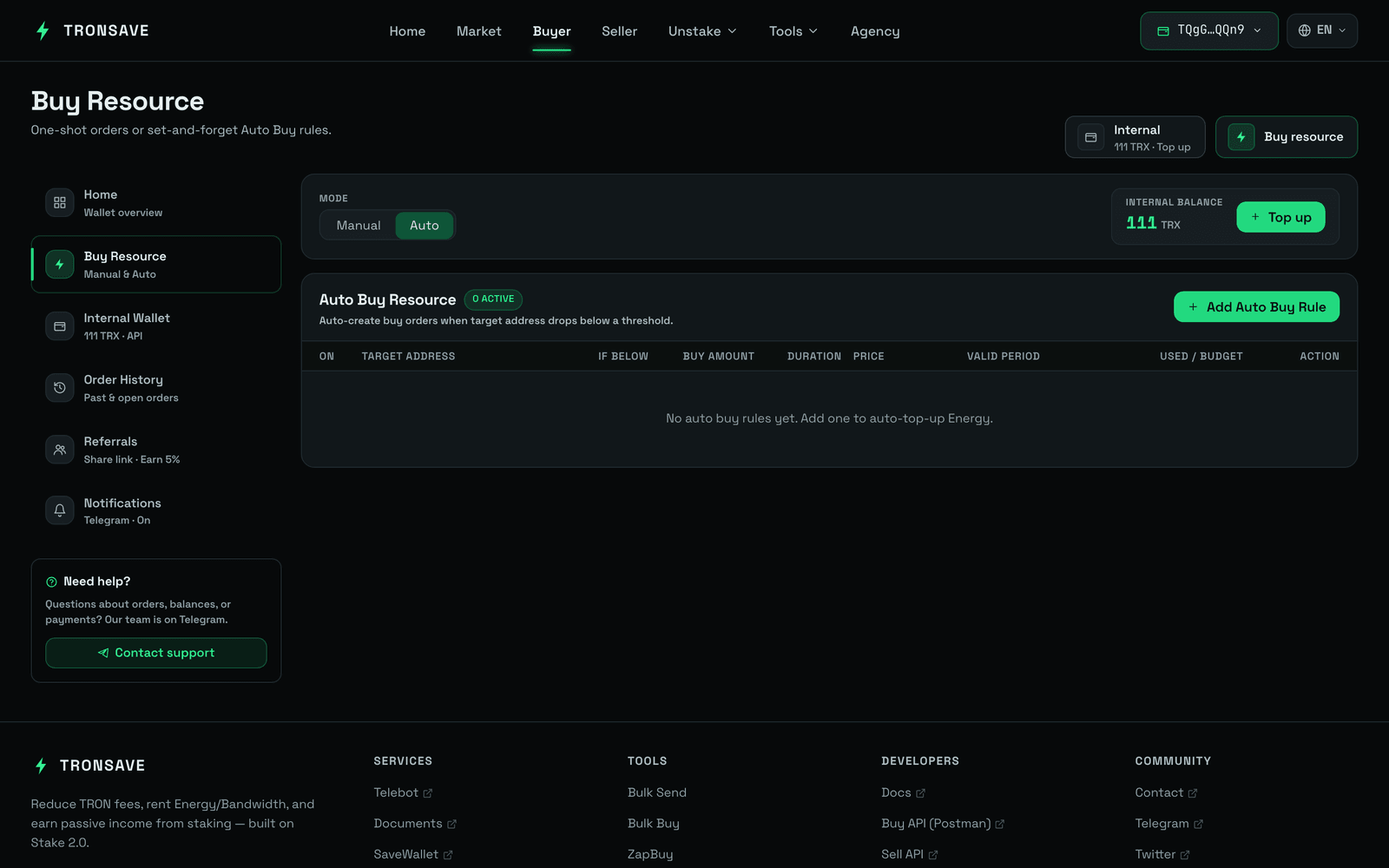
### 第 2 步 — 打开 Buyer → Buy Resource
* 选择**能量**或**带宽**。
* 在购买类型下,选择 **Auto**(自动)。
### 第 3 步 — 添加自动购买规则
选择 **Add Auto Buy Energy Rule**(添加自动购买能量规则)按钮。
 ### 第 4 步 — 检查你的内部余额
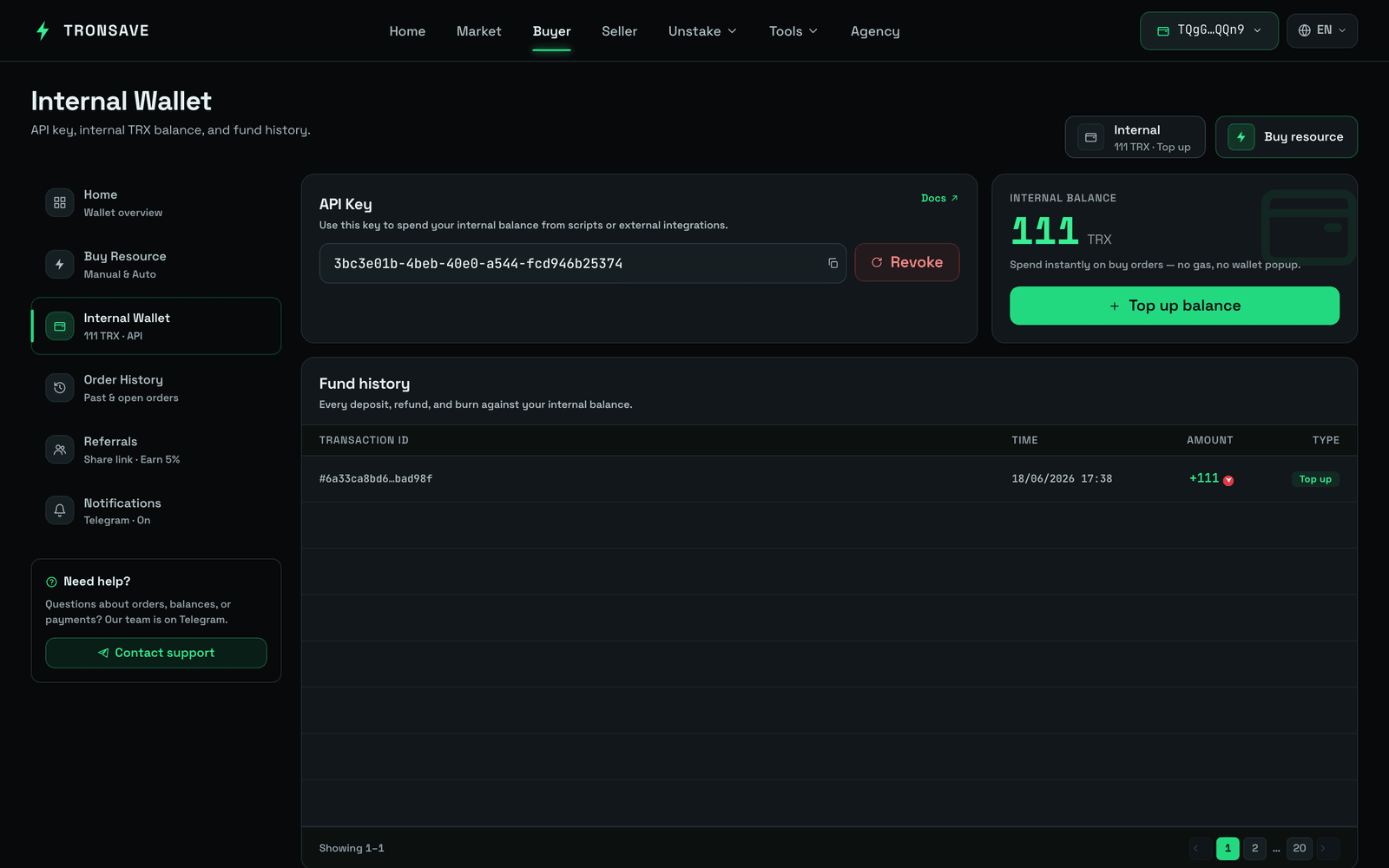 自动购买从你的**内部账户余额**中扣款,而不是直接从你的钱包中扣款。要充值,请点击 **Recharge**(充值)并向显示的地址存入 TRX。
### 第 5 步 — 配置规则
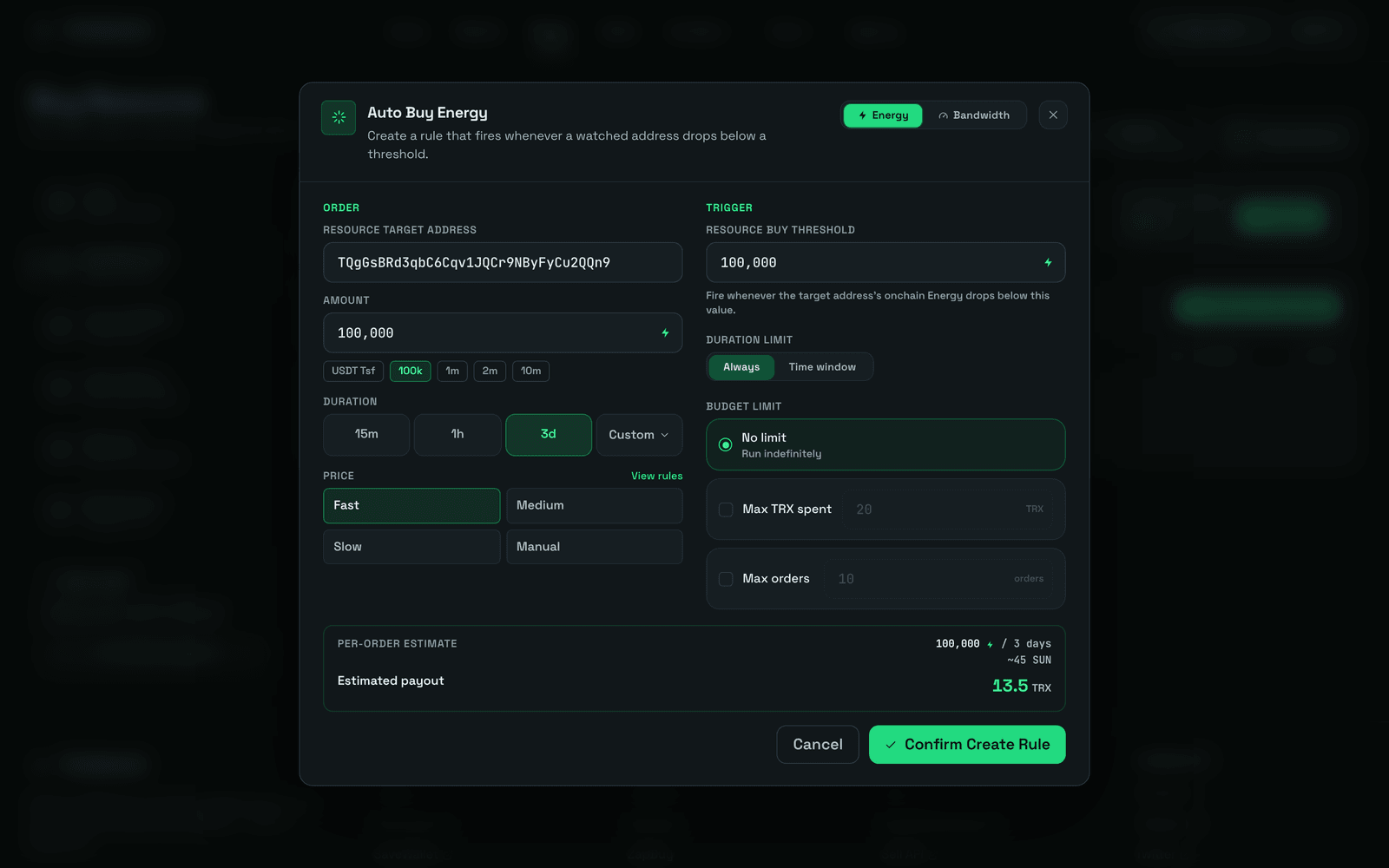
**购买订单设置**(每次触发自动购买时应用):
| 字段 | 说明 |
| ------------------------- | ---------------------------------------------------------- |
| `Resource Target Address` | 需要能量或带宽的钱包。它不能是合约地址或任何其他无效地址。 |
| `Amount` | 要购买的资源数量。 |
| `Duration` | 资源租赁的时长。 |
| `Price` | 选择 Fast(快)、Medium(中)、Slow(慢)或 Manual(手动)价格。建议使用 Medium(中)。 |
**资源购买阈值** — 资源余额的最低值。当目标地址的能量或带宽低于此阈值时,系统会自动触发一笔新订单。
**时长限制** — 决定自动购买何时生效。将其设置为 **Always**(始终)或配置自定义时间范围。
**预算限制** — 定义自动购买的停止条件:
* **No Limit**(无限制)— 不受限制地持续购买。
* **Amount Limit**(金额限制)— 当花费的 TRX 总额达到你设置的金额时停止。
* **Order Limit**(订单数量限制)— 当订单数量达到你设置的上限时停止。
保存后,每当目标地址的余额低于阈值时,系统都会自动创建购买订单,直到达到某项预算限制为止。
## 管理自动购买规则
规则创建后,你可以通过以下操作来管理它。
自动购买从你的**内部账户余额**中扣款,而不是直接从你的钱包中扣款。要充值,请点击 **Recharge**(充值)并向显示的地址存入 TRX。
### 第 5 步 — 配置规则
**购买订单设置**(每次触发自动购买时应用):
| 字段 | 说明 |
| ------------------------- | ---------------------------------------------------------- |
| `Resource Target Address` | 需要能量或带宽的钱包。它不能是合约地址或任何其他无效地址。 |
| `Amount` | 要购买的资源数量。 |
| `Duration` | 资源租赁的时长。 |
| `Price` | 选择 Fast(快)、Medium(中)、Slow(慢)或 Manual(手动)价格。建议使用 Medium(中)。 |
**资源购买阈值** — 资源余额的最低值。当目标地址的能量或带宽低于此阈值时,系统会自动触发一笔新订单。
**时长限制** — 决定自动购买何时生效。将其设置为 **Always**(始终)或配置自定义时间范围。
**预算限制** — 定义自动购买的停止条件:
* **No Limit**(无限制)— 不受限制地持续购买。
* **Amount Limit**(金额限制)— 当花费的 TRX 总额达到你设置的金额时停止。
* **Order Limit**(订单数量限制)— 当订单数量达到你设置的上限时停止。
保存后,每当目标地址的余额低于阈值时,系统都会自动创建购买订单,直到达到某项预算限制为止。
## 管理自动购买规则
规则创建后,你可以通过以下操作来管理它。
 | # | 操作 | 作用 |
| - | ----------- | ------------------------------------- |
| 1 | **启用 / 停用** | 在不删除规则的情况下临时停止或重新启动规则。 |
| 2 | **编辑** | 更改阈值、时长、价格或预算限制。 |
| 3 | **删除** | 永久移除该规则。 |
| 4 | **历史** | 查看过去自动购买订单的执行日志 — 资源数量、时长、价格和花费的 TRX。 |
## 常见问题
**自动购买使用哪个钱包付款?** 自动购买仅使用你**内部账户**中的余额。
**自动购买何时会被停用?** 自动购买在以下情况会自动停止:
* 达到**时长限制**或**预算限制**。
* 你**手动停用**它。
* **内部账户余额耗尽** — 系统会将正在运行的规则设置为*未激活*。
**如果系统停止了自动购买,我该怎么办?**
* 如果它是在达到限制(时长或预算)后停止的,请**编辑设置**并**重新激活**它,或者创建一条**新规则**。
* 如果它是因余额不足而停止的,请**向你的内部账户存入更多 TRX**,然后**重新激活**该规则。
## 后续步骤
* [订单类型](/chinese/concepts/order-types.md) · [能量与带宽](/chinese/concepts/energy-and-bandwidth.md) · [价格与 APY](/chinese/concepts/pricing-and-apy.md)
* 其他购买方式:[在网站上购买](/chinese/guides/buy/on-the-website.md) · [在 Telegram 上购买](/chinese/guides/buy/on-telegram.md) · [ZapBuy](/chinese/guides/buy/zapbuy.md)
| # | 操作 | 作用 |
| - | ----------- | ------------------------------------- |
| 1 | **启用 / 停用** | 在不删除规则的情况下临时停止或重新启动规则。 |
| 2 | **编辑** | 更改阈值、时长、价格或预算限制。 |
| 3 | **删除** | 永久移除该规则。 |
| 4 | **历史** | 查看过去自动购买订单的执行日志 — 资源数量、时长、价格和花费的 TRX。 |
## 常见问题
**自动购买使用哪个钱包付款?** 自动购买仅使用你**内部账户**中的余额。
**自动购买何时会被停用?** 自动购买在以下情况会自动停止:
* 达到**时长限制**或**预算限制**。
* 你**手动停用**它。
* **内部账户余额耗尽** — 系统会将正在运行的规则设置为*未激活*。
**如果系统停止了自动购买,我该怎么办?**
* 如果它是在达到限制(时长或预算)后停止的,请**编辑设置**并**重新激活**它,或者创建一条**新规则**。
* 如果它是因余额不足而停止的,请**向你的内部账户存入更多 TRX**,然后**重新激活**该规则。
## 后续步骤
* [订单类型](/chinese/concepts/order-types.md) · [能量与带宽](/chinese/concepts/energy-and-bandwidth.md) · [价格与 APY](/chinese/concepts/pricing-and-apy.md)
* 其他购买方式:[在网站上购买](/chinese/guides/buy/on-the-website.md) · [在 Telegram 上购买](/chinese/guides/buy/on-telegram.md) · [ZapBuy](/chinese/guides/buy/zapbuy.md)