> For the complete documentation index, see [llms.txt](https://docs.tronsave.io/llms.txt). Markdown versions of documentation pages are available by appending `.md` to page URLs; this page is available as [Markdown](https://docs.tronsave.io/chinese/guides/buy/on-telegram/deposit-trx.md).
# 充值 TRX
在通过 Telegram 机器人购买能量或带宽之前,你需要先在机器人钱包中存入 TRX。本页将引导你获取充值地址并向其转入 TRX。
## 第 1 步:获取你的充值地址
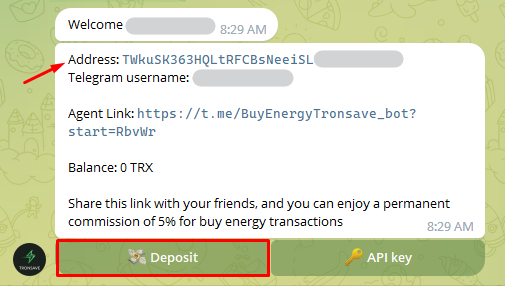
直接复制 **User Info**(用户信息)中显示的 `Address`(地址),或点击 **Deposit**(充值)按钮,以显示地址及对应的二维码。
Click "Deposit"
## 第 2 步:转入 TRX
1. 复制钱包地址,或扫描二维码以获取接收地址。
2. 输入你想转入的 TRX 数量。最低充值额为 **10 TRX**。
3. 点击 **Sign**(签名)以确认转账交易。
{% hint style="info" %}
* 首次充值需要额外支付约 1 TRX 的费用,用于激活新地址。
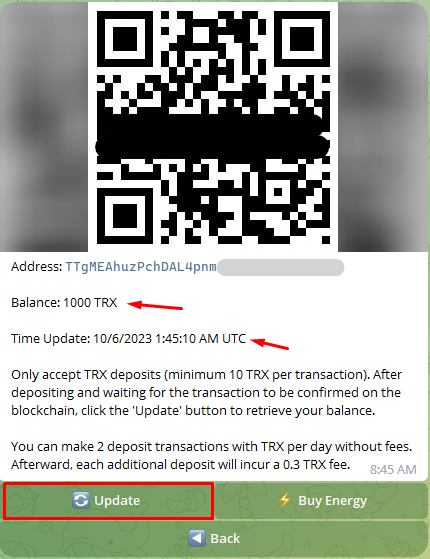
* 你每天可以进行 2 次免手续费的 TRX 充值。超过后,每笔额外充值将收取 0.3 TRX 的手续费。
{% endhint %}
## 第 3 步:等待确认
充值成功后,点击 **Update**(更新)以刷新数据。余额和时间会自动更新并显示最新信息。
## 后续步骤
余额充值完成后,前往 [购买能量与带宽](/chinese/guides/buy.md) 下达你的第一笔订单。
---
# Agent Instructions
This documentation is published with GitBook. GitBook is the documentation platform designed so that both humans and AI agents can read, navigate, and reason over technical content effectively. Learn more at gitbook.com.
## Querying This Documentation
If you need additional information that is not directly available in this page, you can query the documentation dynamically by asking a question.
Perform an HTTP GET request on the current page URL with the `ask` query parameter, and the optional `goal` query parameter:
```
GET https://docs.tronsave.io/chinese/guides/buy/on-telegram/deposit-trx.md?ask=&goal=
```
`ask` is the immediate question: it should be specific, self-contained, and written in natural language.
`goal` is optional and describes the broader end goal you are ultimately trying to accomplish on behalf of the user. GitBook uses it to tailor the answer towards what is most useful for that goal.
The response will contain a direct answer to the question and relevant excerpts and sources from the documentation.
Use this mechanism when the answer is not explicitly present in the current page, you need clarification or additional context, or you want to retrieve related documentation sections.