> For the complete documentation index, see [llms.txt](https://docs.tronsave.io/llms.txt). Markdown versions of documentation pages are available by appending `.md` to page URLs; this page is available as [Markdown](https://docs.tronsave.io/chinese/guides/buy/on-telegram/get-api-key.md).

# 获取 API 密钥

你的 TronSave API 密钥用于对 TronSave API 的程序化请求进行身份验证。Telegram 机器人会展示与你内部账户关联的密钥，方便你复制后用于 REST API 和 SDK。

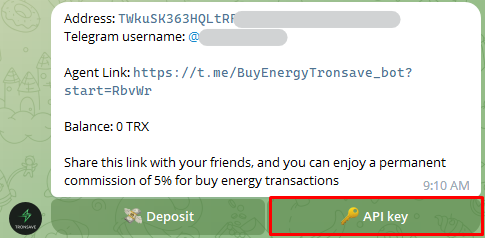
## 第 1 步：在用户信息中打开 API 密钥

在机器人中，进入你的 **User Info**（用户信息），然后选择 **API key**（API 密钥）按钮。

<figure><img src="https://1055070949-files.gitbook.io/~/files/v0/b/gitbook-x-prod.appspot.com/o/spaces%2Fh0rlDWTk05Qu3lvB5Gve%2Fuploads%2FPXZWe1N1M6t0HJdNz3Ah%2Fimage.png?alt=media&#x26;token=08fb213d-dc09-4657-b1be-41bcae55e79d" alt=""><figcaption></figcaption></figure>

## 第 2 步：复制 API 密钥

点击 API 密钥即可将其复制到剪贴板。

<figure><img src="https://1055070949-files.gitbook.io/~/files/v0/b/gitbook-x-prod.appspot.com/o/spaces%2Fh0rlDWTk05Qu3lvB5Gve%2Fuploads%2Ft56PrV7m0pvsygYBCi0J%2Fimage.png?alt=media&#x26;token=219646b8-49cc-4253-9771-0994a11face6" alt=""><figcaption></figcaption></figure>

{% hint style="warning" %}
请像对待密码一样对待你的 API 密钥。任何持有该密钥的人都可以花费你内部账户中的 TRX 余额。
{% endhint %}

## 撤销 API 密钥

如果你需要更换 API 密钥，请选择 **Revoke**（撤销）以生成一个新的密钥。

{% hint style="info" %}
我们不建议更换 API 密钥。仅在必要时才撤销它——撤销会使旧密钥失效，任何仍在使用旧密钥的集成都将无法工作。
{% endhint %}

<figure><img src="https://1055070949-files.gitbook.io/~/files/v0/b/gitbook-x-prod.appspot.com/o/spaces%2Fh0rlDWTk05Qu3lvB5Gve%2Fuploads%2FXwhmyqb8SO0w1uBY4u0R%2Fimage.png?alt=media&#x26;token=83079f23-7029-463d-a142-91b1b9fefefc" alt=""><figcaption><p>点击 "Revoke"</p></figcaption></figure>

然后确认操作：

* 点击 **Confirm**（确认）以生成新的 API 密钥。
* 点击 **Cancel**（取消）以停止该操作。

<figure><img src="https://1055070949-files.gitbook.io/~/files/v0/b/gitbook-x-prod.appspot.com/o/spaces%2Fh0rlDWTk05Qu3lvB5Gve%2Fuploads%2FvkrfT8wcPgy8C9787aKe%2Fimage.png?alt=media&#x26;token=e9bdaf25-de51-40a0-930d-ad19653632c2" alt=""><figcaption></figcaption></figure>

## 后续步骤

* [身份验证](/chinese/developers/authentication.md)
* [使用 API 密钥购买资源](/chinese/developers/api-reference/buy-resources/api-key.md)


---

# Agent Instructions
This documentation is published with GitBook. GitBook is the documentation platform designed so that both humans and AI agents can read, navigate, and reason over technical content effectively. Learn more at gitbook.com.

## Querying This Documentation
If you need additional information that is not directly available in this page, you can query the documentation dynamically by asking a question.

Perform an HTTP GET request on the current page URL with the `ask` query parameter, and the optional `goal` query parameter:

```
GET https://docs.tronsave.io/chinese/guides/buy/on-telegram/get-api-key.md?ask=<question>&goal=<endgoal>
```

`ask` is the immediate question: it should be specific, self-contained, and written in natural language.
`goal` is optional and describes the broader end goal you are ultimately trying to accomplish on behalf of the user. GitBook uses it to tailor the answer towards what is most useful for that goal.

The response will contain a direct answer to the question and relevant excerpts and sources from the documentation.

Use this mechanism when the answer is not explicitly present in the current page, you need clarification or additional context, or you want to retrieve related documentation sections.
