> For the complete documentation index, see [llms.txt](https://docs.tronsave.io/llms.txt). Markdown versions of documentation pages are available by appending `.md` to page URLs; this page is available as [Markdown](https://docs.tronsave.io/chinese/guides/buy/resource-notifications.md).

# 资源通知

**Telegram 通知**让您在 Telegram 中即时收到关于订单和市场机会的提醒，从而无需频繁查看平台即可及时采取行动。

该功能涵盖市场的买卖双方：

* **买家通知（本页）** — 当租赁的资源订单即将被回收，或您的能量/带宽余额低于阈值时发出提醒。
* **卖家通知** — 当某个买单符合您的出售条件（Suggest Sell）时发出提醒，帮助您以理想价格更快地完成出售。请参阅 Suggest Sell 指南。

**资源通知**是买家侧的提醒：当已购买的能量或带宽订单接近其回收时间，或余额即将不足时，它们会通知您 — 以便您在服务中断之前进行延期、重新购买或充值。

<figure><img src="https://1055070949-files.gitbook.io/~/files/v0/b/gitbook-x-prod.appspot.com/o/spaces%2Fh0rlDWTk05Qu3lvB5Gve%2Fuploads%2FCflFpTGKjeJGDV74wQyf%2Fimage.png?alt=media&#x26;token=a8d601ea-bc0b-4a18-8706-d1f3c5762a68" alt=""><figcaption></figcaption></figure>

## 设置 Telegram 通知

### 第 1 步 — 打开通知选项卡

进入 **BUYER**（买家）板块，点击 **NOTIFICATIONS**（通知）选项卡。

<figure><img src="https://1055070949-files.gitbook.io/~/files/v0/b/gitbook-x-prod.appspot.com/o/spaces%2Fh0rlDWTk05Qu3lvB5Gve%2Fuploads%2FszmrAeA6SyxYXv8BXWoJ%2Fimage.png?alt=media&#x26;token=94b90ee0-b936-40ac-8391-9888c0cc4f0f" alt=""><figcaption></figcaption></figure>

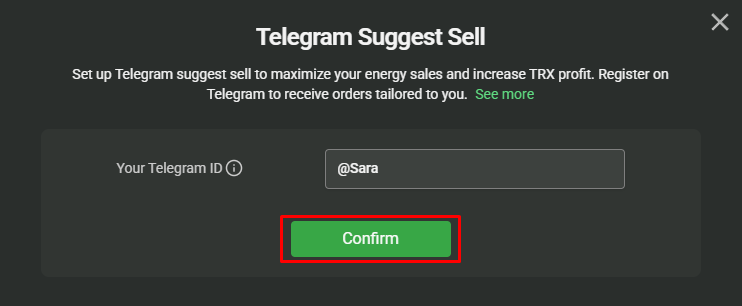
在提供的输入框中填入您的 Telegram ID，然后点击 **CONFIRM**（确认）。

<figure><img src="https://1055070949-files.gitbook.io/~/files/v0/b/gitbook-x-prod.appspot.com/o/spaces%2Fh0rlDWTk05Qu3lvB5Gve%2Fuploads%2FifvvZvQAjFkBEa2cSl5z%2Fimage.png?alt=media&#x26;token=2d26d3d9-b82c-40fd-8dff-dacccd3cf2b2" alt=""><figcaption></figcaption></figure>

<figure><img src="https://1055070949-files.gitbook.io/~/files/v0/b/gitbook-x-prod.appspot.com/o/spaces%2Fh0rlDWTk05Qu3lvB5Gve%2Fuploads%2Fg1iaRIOgbqSMEU5V79LT%2Fimage.png?alt=media&#x26;token=f7b4a469-7168-42cd-aa41-41743d5856c5" alt=""><figcaption></figcaption></figure>

### 第 2 步 — 验证您的 Telegram

点击 **GET CODE**（获取验证码）开始验证。

<figure><img src="https://1055070949-files.gitbook.io/~/files/v0/b/gitbook-x-prod.appspot.com/o/spaces%2Fh0rlDWTk05Qu3lvB5Gve%2Fuploads%2FcdjTNqB9A9lxN5bUgZpr%2Fimage.png?alt=media&#x26;token=96034a4b-feff-443f-8397-2b3f3b31be70" alt=""><figcaption></figcaption></figure>

随后会出现一个指向 TronSave Telegram 机器人的链接 — 点击它即可打开 Telegram。

<figure><img src="https://1055070949-files.gitbook.io/~/files/v0/b/gitbook-x-prod.appspot.com/o/spaces%2Fh0rlDWTk05Qu3lvB5Gve%2Fuploads%2FtS89l65J5g81GaDi7RSu%2Fimage.png?alt=media&#x26;token=87ad9b4a-e6f3-4162-8971-304154ff99d0" alt=""><figcaption></figcaption></figure>

在机器人中，点击 **Click here to verify**（点击此处验证）即可自动跳转到验证页面，或者复制 `CODE` 并手动输入。

<figure><img src="https://1055070949-files.gitbook.io/~/files/v0/b/gitbook-x-prod.appspot.com/o/spaces%2Fh0rlDWTk05Qu3lvB5Gve%2Fuploads%2F4DA70yJUxowuVkkFCU2s%2Fimage.png?alt=media&#x26;token=89f12f9b-8a62-4847-84d6-35360fd4cc95" alt=""><figcaption></figcaption></figure>

### 第 3 步 — 配置您的筛选条件

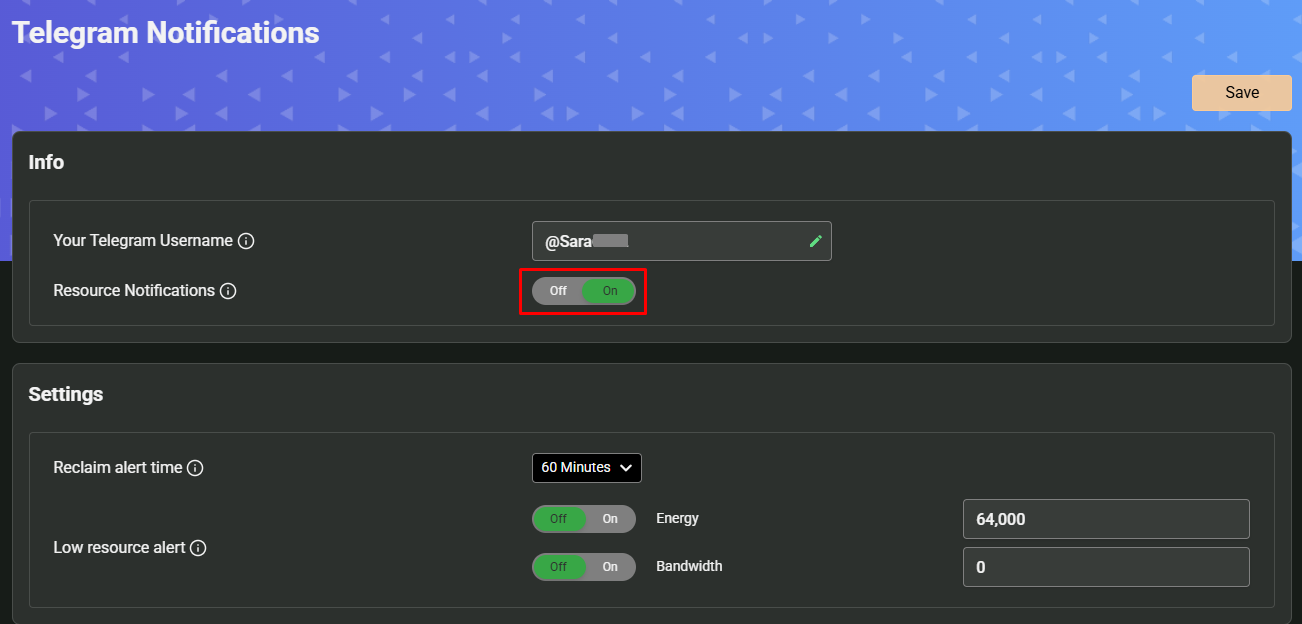
验证完成后，将资源通知开关切换为 **ON**（开启），以显示可用的筛选条件。

<figure><img src="https://1055070949-files.gitbook.io/~/files/v0/b/gitbook-x-prod.appspot.com/o/spaces%2Fh0rlDWTk05Qu3lvB5Gve%2Fuploads%2FG5uB9XKbr2lm85IqGHcs%2Fimage.png?alt=media&#x26;token=b6823e50-a47a-4131-b59f-fc7dd8ed7a78" alt=""><figcaption></figcaption></figure>

## 通知类型

### 回收提醒

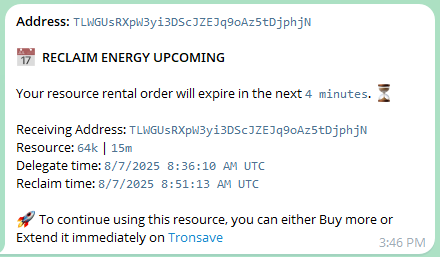
当已购买的能量或带宽订单即将到达其回收时间时通知您，以便您在资源被回收并变得不可用之前**延期或重新购买**该资源。

* **可配置的提前时间** — 选择您希望提前多久收到提醒（例如，在回收前 60 分钟）。

<figure><img src="https://1055070949-files.gitbook.io/~/files/v0/b/gitbook-x-prod.appspot.com/o/spaces%2Fh0rlDWTk05Qu3lvB5Gve%2Fuploads%2F1pvMjvOljqrWhyrXD4cE%2Fimage.png?alt=media&#x26;token=c1bfcf25-6930-45c4-a935-25c3a91c7de2" alt=""><figcaption></figcaption></figure>

### 资源不足提醒

当您的能量或带宽降至您所设定的阈值以下时发出提醒，以便您在余额降到 `0` 并导致交易开始失败之前采取行动。

* **按资源类型控制** — 可为能量、带宽或两者同时启用提醒。
* **独立阈值** — 为每种资源类型设置不同的阈值。

<figure><img src="https://1055070949-files.gitbook.io/~/files/v0/b/gitbook-x-prod.appspot.com/o/spaces%2Fh0rlDWTk05Qu3lvB5Gve%2Fuploads%2FJ0xCEX8P4rMhp3rOrcRN%2Fimage.png?alt=media&#x26;token=bfea405b-b567-4ef4-bef0-7cd51d41c9bf" alt=""><figcaption></figcaption></figure>

{% hint style="info" %}
回收提醒跟踪您的活跃租赁订单；资源不足提醒跟踪您地址上的实时能量/带宽余额。同时启用两者可获得全面的覆盖。请参阅 [能量与带宽](/chinese/concepts/energy-and-bandwidth.md) 了解这些资源是如何被消耗的。
{% endhint %}

## 后续步骤

* [购买能量与带宽](/chinese/guides/buy.md) — 下达这些提醒将要跟踪的订单。
* [订单类型](/chinese/concepts/order-types.md) — 了解回收时间和租赁时长。


---

# Agent Instructions
This documentation is published with GitBook. GitBook is the documentation platform designed so that both humans and AI agents can read, navigate, and reason over technical content effectively. Learn more at gitbook.com.

## Querying This Documentation
If you need additional information that is not directly available in this page, you can query the documentation dynamically by asking a question.

Perform an HTTP GET request on the current page URL with the `ask` query parameter:

```
GET https://docs.tronsave.io/chinese/guides/buy/resource-notifications.md?ask=<question>
```

The question should be specific, self-contained, and written in natural language.
The response will contain a direct answer to the question and relevant excerpts and sources from the documentation.

Use this mechanism when the answer is not explicitly present in the current page, you need clarification or additional context, or you want to retrieve related documentation sections.