> For the complete documentation index, see [llms.txt](https://docs.tronsave.io/llms.txt). Markdown versions of documentation pages are available by appending `.md` to page URLs; this page is available as [Markdown](https://docs.tronsave.io/chinese/guides/extend/advance.md).
# 高级延长
**高级模式(Advance)** 是手动扩展模式。它不是一键充值,而是让你选择各个代理地址、为每个地址精确选择扩展方式,并将所有内容作为单笔支付进行确认。当你想要精确控制时长和数量,或需要一次性扩展多个已代理的区块时,可以使用该模式。
本指南分四个步骤介绍整个流程。
## 第 1 步 — 打开扩展(Extend)选项卡
先将你的钱包连接到市场,然后向下滚动到 **Extend** 部分,选择你想要扩展的订单。
打开扩展选项卡
## 第 2 步 — 选择"Advance"选项
## 第 3 步 — 调整扩展请求
高级模式面板初看起来可能信息密集。下面说明每个部分的作用。
**1. 批量控制。** 这些选项会将一个设置应用到每个所选请求:
* **使用相同设置(Using the same settings)** — 将相同的扩展和购买选项应用到所有选中的扩展和购买请求。
* **仅相同扩展(Same extend only)** — 将相同的扩展选项应用到所有选中的请求。
* **相同时长(Same duration)** — 将相同的时长应用到所有选中的请求。
**2. 代理地址表。** 该表列出了所有其已代理资源与目标地址匹配的代理地址。当某个代理地址可供扩展时,其**选择框**处于激活状态。使用 **All** 可一次性选择所有可用的代理地址。
当你选择一个代理地址时,扩展选项会出现。你可以选择以下三种模式之一:
### 仅扩展
选择从现在起 1 到 30 天的扩展时长。所选时长必须**大于**当前的到期时间。例如,如果现有代理还有 3 天到期,你必须选择 4 到 30 天的时长。
{% hint style="info" %}
**示例**
* **旧代理:** A 向 B 代理了 100k,还有 3 天到期。
* 你选择将时长扩展到 5 天。
* **新代理:** A 向 B 代理了 100k,还有 5 天到期。
{% endhint %}
### 仅购买更多
如果该代理地址的剩余能量大于 100k,你可以在现有代理的基础上选择购买一定数量。
{% hint style="info" %}
**示例**
* **旧代理:** A 向 B 代理了 100k,还有 3 天到期。
* 你选择再购买 100k 能量。
* **新代理:** A 向 B 代理了 200k,还有 3 天到期。
{% endhint %}
### 扩展并购买
如果该代理地址的剩余能量大于 100k,你可以在同一个请求中购买更多能量**并**选择从现在起 1 到 30 天的扩展时长。
{% hint style="info" %}
**示例**
* **旧代理:** A 向 B 代理了 100k,还有 3 天到期。
* 你选择再购买 100k 能量并将时长扩展到 5 天。
* **新代理:** A 向 B 代理了 200k,还有 5 天到期。
{% endhint %}
所选项的预估支付金额显示在右侧。
**3. 汇总。** 显示所有选中项的扩展总量以及所有请求的预估支付总额。
## 第 4 步 — 确认并支付
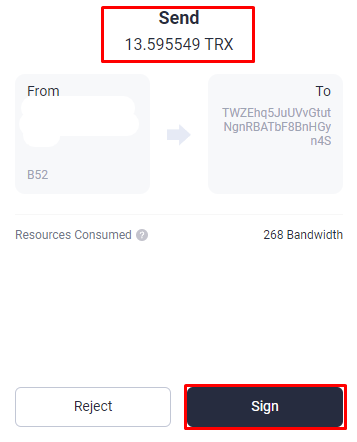
在 **Extend Order Details(扩展订单详情)** 阶段,TronSave 会汇总每个扩展请求及其扩展数量和支付金额。请仔细核对,然后点击 **Extend** 开始签名转账交易。转账金额必须等于扩展支付金额才能发送你的请求。
{% hint style="warning" %}
请确保**转账交易**的金额与\*\*支付(Payout)\*\*中的金额相同。
{% endhint %}
转账金额必须与扩展订单确认(Extend Order Confirm)中显示的支付金额一致
核对完所有内容后,点击 **Sign transaction**。如果请求成功,会出现成功弹窗,流程进入 **Successfully(成功)** 阶段。
## 后续步骤
* 想要更快的充值方式?请参阅 [快速扩展](/chinese/guides/extend.md)。
* 第一次租赁?从 [如何购买能量和带宽](/chinese/guides/buy.md) 开始。
---
# Agent Instructions
This documentation is published with GitBook. GitBook is the documentation platform designed so that both humans and AI agents can read, navigate, and reason over technical content effectively. Learn more at gitbook.com.
## Querying This Documentation
If you need additional information that is not directly available in this page, you can query the documentation dynamically by asking a question.
Perform an HTTP GET request on the current page URL with the `ask` query parameter:
```
GET https://docs.tronsave.io/chinese/guides/extend/advance.md?ask=
```
The question should be specific, self-contained, and written in natural language.
The response will contain a direct answer to the question and relevant excerpts and sources from the documentation.
Use this mechanism when the answer is not explicitly present in the current page, you need clarification or additional context, or you want to retrieve related documentation sections.