> For the complete documentation index, see [llms.txt](https://docs.tronsave.io/llms.txt). Markdown versions of documentation pages are available by appending `.md` to page URLs; this page is available as [Markdown](https://docs.tronsave.io/chinese/guides/partner-bot-agency/bot-management.md).

# 机器人管理

## 激活机器人代理

如果你的机器人代理在 7 天内未收到任何购买订单,它会被暂时停用。重新激活需要花费 **5 TRX**。

要重新激活,请按 **Active Bot** 按钮并签名交易。机器人将在约 1 分钟内重启,随后即被重新激活。

<figure><img src="https://1055070949-files.gitbook.io/~/files/v0/b/gitbook-x-prod.appspot.com/o/spaces%2Fh0rlDWTk05Qu3lvB5Gve%2Fuploads%2FxJmPiYdh8h1g6HYWoo1B%2Fimage.png?alt=media&#x26;token=459015ee-f2c1-48b7-a78d-e294a19719f1" alt=""><figcaption></figcaption></figure>

### 机器人状态

| 状态           | 含义                                   |
| ------------ | ------------------------------------ |
| **Active**   | 机器人正常运行。                             |
| **Inactive** | 机器人因超过 7 天无购买订单而被暂停。                 |
| **Pending**  | 机器人正在重启。                             |
| **Deleting** | 机器人正在被移除。                            |
| **Rejected** | 发生错误导致系统无法激活机器人。它可能已被 Telegram 临时封禁。 |

## 更新机器人信息

### 更改名称

1. 点击 **Change Name** 按钮。

<figure><img src="https://1055070949-files.gitbook.io/~/files/v0/b/gitbook-x-prod.appspot.com/o/spaces%2Fh0rlDWTk05Qu3lvB5Gve%2Fuploads%2FBKMAfcrY4i7WeuowTUwY%2Fimage.png?alt=media&#x26;token=b55399a4-be26-454d-a7b7-69e2d86269d2" alt=""><figcaption></figcaption></figure>

2. 输入机器人的新显示名称。你也可以在此同时编辑 **Name** 和 **Description**。点击 **Update Bot** 以完成。

<figure><img src="https://1055070949-files.gitbook.io/~/files/v0/b/gitbook-x-prod.appspot.com/o/spaces%2Fh0rlDWTk05Qu3lvB5Gve%2Fuploads%2FGIzDwnlENdmsRHhejCKu%2Fimage.png?alt=media&#x26;token=61d28159-9e1e-4167-9317-228324c5aa76" alt="" width="563"><figcaption></figcaption></figure>

{% hint style="info" %}
为防止 Telegram 将机器人标记为垃圾信息并将其封禁,系统将名称更改限制为**每天一次**。
{% endhint %}

### 添加或更改描述

1. 点击 **Change Name** 按钮。

<figure><img src="https://1055070949-files.gitbook.io/~/files/v0/b/gitbook-x-prod.appspot.com/o/spaces%2Fh0rlDWTk05Qu3lvB5Gve%2Fuploads%2FBKMAfcrY4i7WeuowTUwY%2Fimage.png?alt=media&#x26;token=b55399a4-be26-454d-a7b7-69e2d86269d2" alt=""><figcaption></figcaption></figure>

2. 输入 **Short Description** 和 **Full Description**,然后点击 **Update Bot** 以保存。

<figure><img src="https://1055070949-files.gitbook.io/~/files/v0/b/gitbook-x-prod.appspot.com/o/spaces%2Fh0rlDWTk05Qu3lvB5Gve%2Fuploads%2Fw1oWdfSRh0am6krVqEYD%2Fimage.png?alt=media&#x26;token=7ffd8179-d362-41d4-a4ab-597808e35265" alt="" width="563"><figcaption></figcaption></figure>

## 删除机器人

要删除机器人,请选择 **Delete Bot** 按钮。

<figure><img src="https://1055070949-files.gitbook.io/~/files/v0/b/gitbook-x-prod.appspot.com/o/spaces%2Fh0rlDWTk05Qu3lvB5Gve%2Fuploads%2FZoG5JgZNtaZq6bAC5ooV%2Fimage.png?alt=media&#x26;token=9a144620-9994-4785-bc08-e88324c0f264" alt=""><figcaption></figcaption></figure>

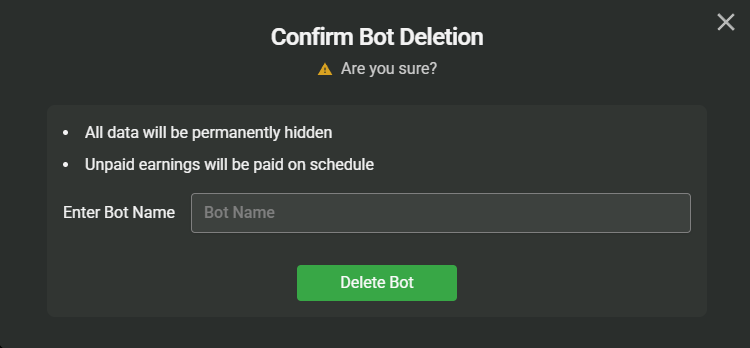
输入机器人的名称以确认,然后再次按 **Delete Bot** 按钮。

<figure><img src="https://1055070949-files.gitbook.io/~/files/v0/b/gitbook-x-prod.appspot.com/o/spaces%2Fh0rlDWTk05Qu3lvB5Gve%2Fuploads%2FTYEONU45K1MRB34q2SQq%2Fimage.png?alt=media&#x26;token=99b27883-e9d1-430e-9165-6dfc8a01c65a" alt="" width="563"><figcaption></figcaption></figure>

{% hint style="info" %}
删除后,若要为此账户重新注册机器人,需要支付 **5 TRX** 的费用。
{% endhint %}


---

# Agent Instructions
This documentation is published with GitBook. GitBook is the documentation platform designed so that both humans and AI agents can read, navigate, and reason over technical content effectively. Learn more at gitbook.com.

## Querying This Documentation
If you need additional information that is not directly available in this page, you can query the documentation dynamically by asking a question.

Perform an HTTP GET request on the current page URL with the `ask` query parameter, and the optional `goal` query parameter:

```
GET https://docs.tronsave.io/chinese/guides/partner-bot-agency/bot-management.md?ask=<question>&goal=<endgoal>
```

`ask` is the immediate question: it should be specific, self-contained, and written in natural language.
`goal` is optional and describes the broader end goal you are ultimately trying to accomplish on behalf of the user. GitBook uses it to tailor the answer towards what is most useful for that goal.

The response will contain a direct answer to the question and relevant excerpts and sources from the documentation.

Use this mechanism when the answer is not explicitly present in the current page, you need clarification or additional context, or you want to retrieve related documentation sections.