> For the complete documentation index, see [llms.txt](https://docs.tronsave.io/llms.txt). Markdown versions of documentation pages are available by appending `.md` to page URLs; this page is available as [Markdown](https://docs.tronsave.io/chinese/guides/referral-program.md).
# 推荐计划
与好友分享您的推荐链接。当有人通过您的链接在 TronSave 上租赁能量时,您将根据他们每笔购买订单的总价值赚取 **5%** 的佣金。
推荐人数和奖励均无上限。
## 设置您的推荐链接
**第 1 步 — 连接您的钱包。** 打开 [tronsave.io](https://tronsave.io/market) 并连接您的 TRON 钱包(例如 TronLink)。
**第 2 步 — 点击 "Referral"(推荐)按钮。**
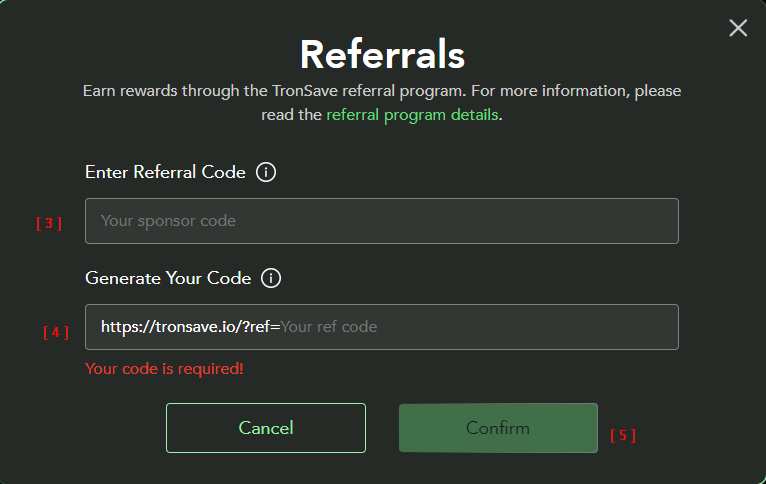
**第 3 步 — 输入您的赞助码(Sponsor Code)** *(可选)*。
{% hint style="info" %}
如果有人向您发送了赞助链接,请使用该确切 URL 打开 TronSave,这样赞助码会被自动应用。
{% endhint %}
**第 4 步 — 生成您的推荐码** *(必填)*。
**第 5 步 — 点击 "Confirm"(确认)。**
## 追踪奖励与统计数据
1. 点击 **Copy**(复制)图标以复制您的推荐链接。
2. 查看您推荐计划的统计数据。
3. 点击 **History**(历史)按钮以查看您的奖励历史。
## 奖励如何发放
{% hint style="info" %}
每当您推荐的用户创建订单时,您都会获得一份奖励。
奖励以 TRX 形式在每周一发放,最低发放金额为 10 TRX。
{% endhint %}
## 后续步骤
* [购买能量与带宽](/chinese/guides/buy.md) — 您的被推荐人将进行的操作。
* [定价与 APY](/chinese/concepts/pricing-and-apy.md) — 订单价值的确定方式。
---
# Agent Instructions
This documentation is published with GitBook. GitBook is the documentation platform designed so that both humans and AI agents can read, navigate, and reason over technical content effectively. Learn more at gitbook.com.
## Querying This Documentation
If you need additional information that is not directly available in this page, you can query the documentation dynamically by asking a question.
Perform an HTTP GET request on the current page URL with the `ask` query parameter, and the optional `goal` query parameter:
```
GET https://docs.tronsave.io/chinese/guides/referral-program.md?ask=&goal=
```
`ask` is the immediate question: it should be specific, self-contained, and written in natural language.
`goal` is optional and describes the broader end goal you are ultimately trying to accomplish on behalf of the user. GitBook uses it to tailor the answer towards what is most useful for that goal.
The response will contain a direct answer to the question and relevant excerpts and sources from the documentation.
Use this mechanism when the answer is not explicitly present in the current page, you need clarification or additional context, or you want to retrieve related documentation sections.