> For the complete documentation index, see [llms.txt](https://docs.tronsave.io/llms.txt). Markdown versions of documentation pages are available by appending `.md` to page URLs; this page is available as [Markdown](https://docs.tronsave.io/chinese/guides/sell/auto-sell.md).
# 自动出售
配置 TronSave,按照你自己的价格和时长规则,使用你质押的能量或带宽自动匹配并履行买家订单。
**自动卖出**让 TronSave 使用你质押的能量或带宽自动匹配并履行收到的买家订单。你只需一次性设置好价格下限、时长上限和利润分成,授予系统代理(委托)权限,TronSave 便会为你处理匹配、代理(委托)和结算。
{% hint style="info" %}
要卖出,你首先需要有可代理(委托)的已质押资源。如果你只持有 TRX,请先进行质押 — 参见[通过质押 2.0 获取能量](/chinese/guides/sell/staking-2.0.md)。关于底层机制,请参见[质押 2.0](/chinese/concepts/staking-2.0.md) 和[订单类型](/chinese/concepts/order-types.md)核心概念。
{% endhint %}
## 配置自动卖出
### 第 1 步:在 TronSave 市场中打开卖家标签页
前往[卖家设置页面](https://tronsave.io/dashboard/seller/settings)。
### 第 2 步:连接你的 TRON 钱包并登录
* 打开 [TronSave 市场](https://tronsave.io/dashboard/seller/settings)并连接你的钱包。
* 点击 **Login TRONSAVE** 并签名消息以登录。
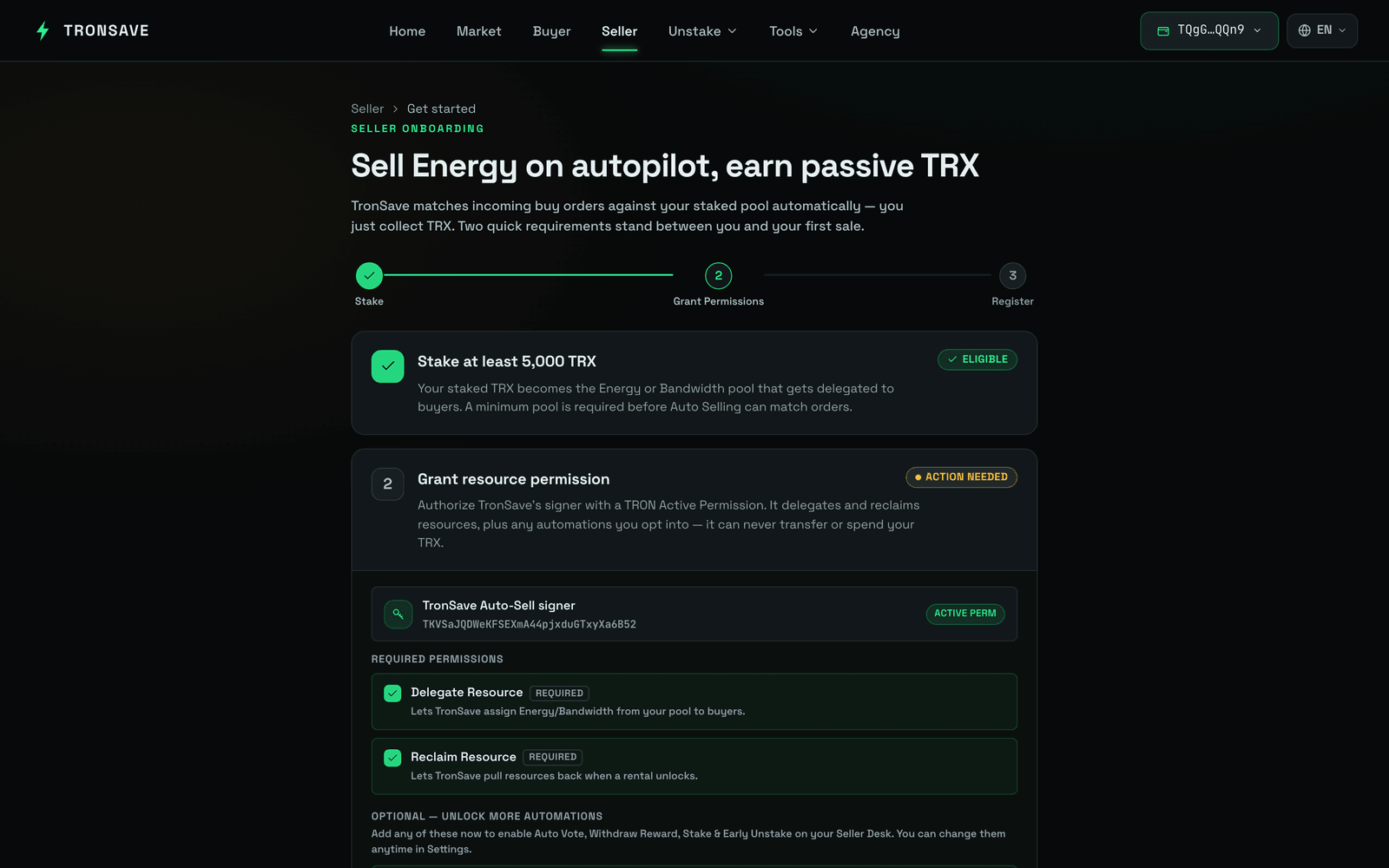 ### 第 3 步:质押能量/带宽(可选)
*如果你已有可用资源,可以跳过此步骤。*
如果你只持有 TRX,尚未质押能量或带宽,请在卖出前进行质押。你可以通过以下任一方式完成:
1. **通过 TronScan 质押**([质押链接](https://tronscan.org/#/wallet/resources))。
2. **直接在 TronSave 上质押** — 点击 **Stake more**。
### 第 3 步:质押能量/带宽(可选)
*如果你已有可用资源,可以跳过此步骤。*
如果你只持有 TRX,尚未质押能量或带宽,请在卖出前进行质押。你可以通过以下任一方式完成:
1. **通过 TronScan 质押**([质押链接](https://tronscan.org/#/wallet/resources))。
2. **直接在 TronSave 上质押** — 点击 **Stake more**。
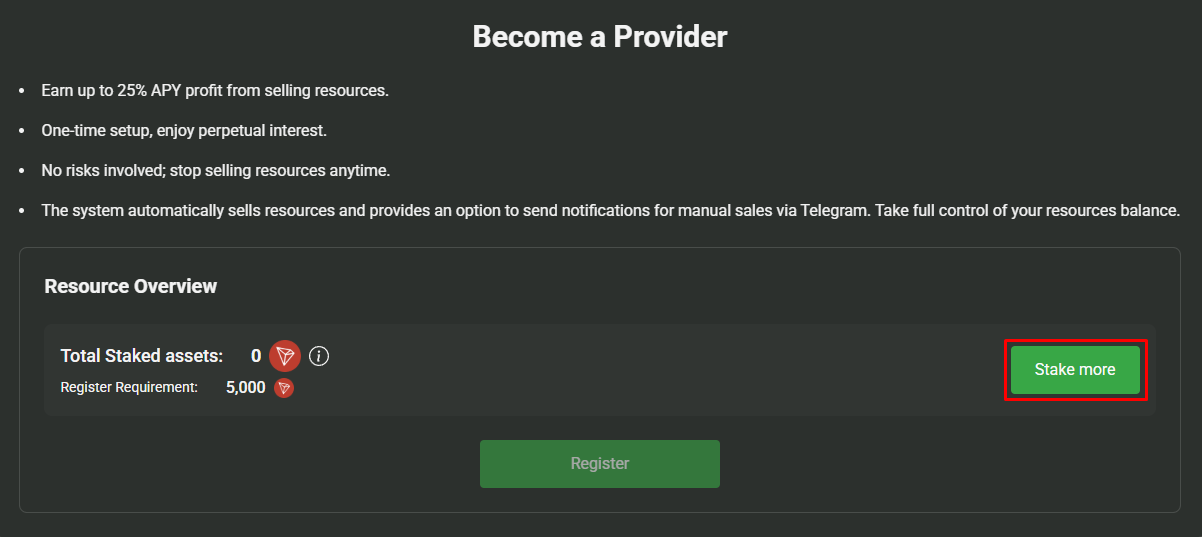 选择**能量**或**带宽**,输入**质押数量**,然后点击 **Stake**。
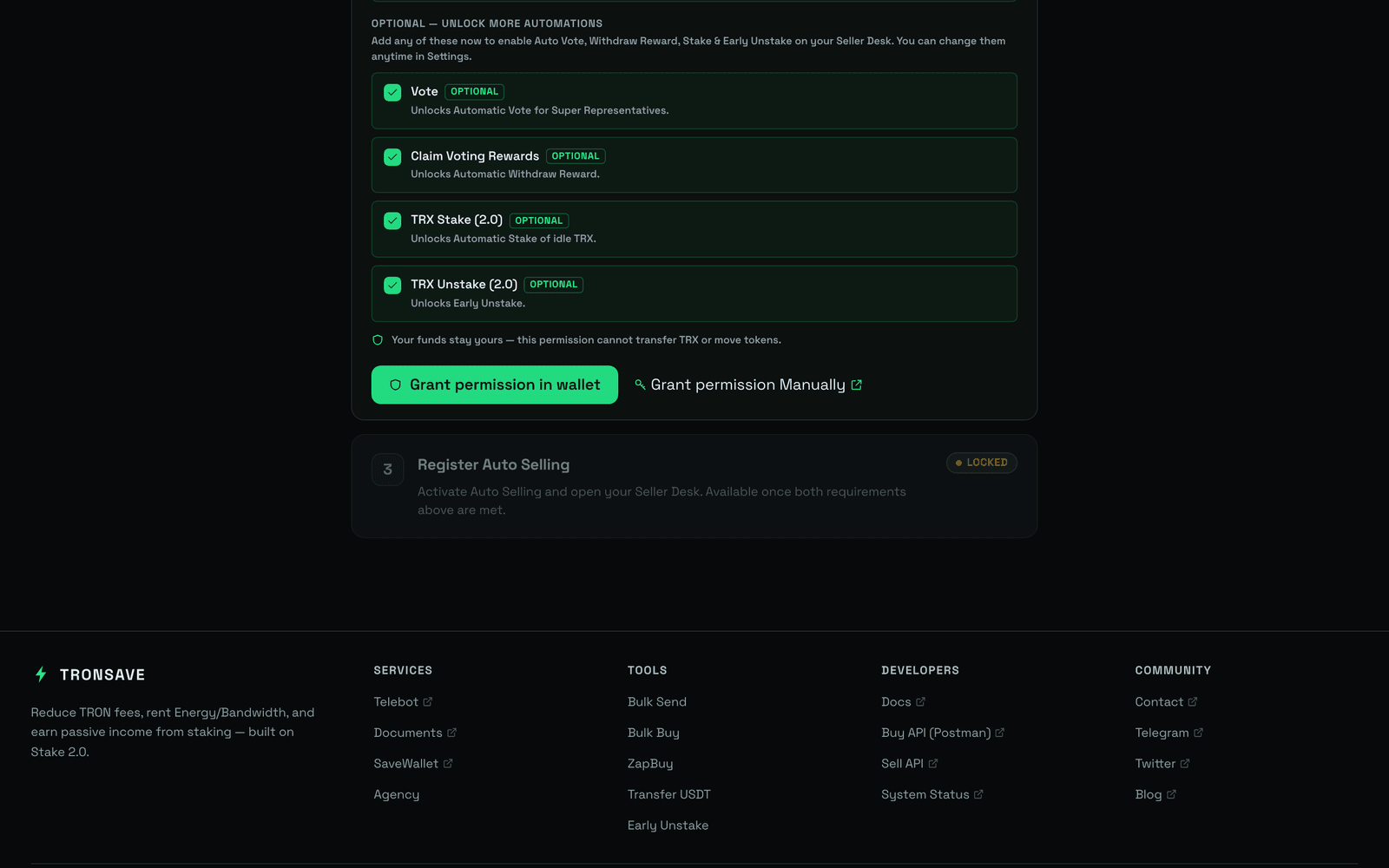
 ### 第 4 步:向 TronSave 授予代理(委托)权限
自动卖出需要权限才能代你从你的账户代理(委托)资源。
### 第 5 步:编辑你的自动卖出条件
设置匹配规则以契合你的策略。
### 第 4 步:向 TronSave 授予代理(委托)权限
自动卖出需要权限才能代你从你的账户代理(委托)资源。
### 第 5 步:编辑你的自动卖出条件
设置匹配规则以契合你的策略。
 | # | 设置项 | 说明 |
| - | ----------------------- | -------------------------------------------------------------------------------------------- |
| 1 | `Automatic matching` | 自动匹配符合你条件的订单。 |
| 2 | `Earning Share` | 你想获取的利润百分比。分成越高,你订单的匹配优先级越低。 |
| 3 | `Allow "Extend Order"` | 允许买家创建延期订单。 |
| 4 | `Max Delegate Duration` | 最长代理(委托)时长。默认为 30 天。 |
| 5 | `Maintain undelegate` | 在账户中保持不代理(委托)的能量数量。这部分数量不会用于订单。 |
| 6 | `Min price` | 你愿意冻结资源的订单的每日最低能量价格,单位为 SUN/天。 |
| 7 | `Min delegate amount` | 可用于履行订单的最小资源数量。这有助于最大化使用你地址中的总资源。 |
| 8 | `Automatic Reclaim` | **TronSave:**仅回收通过 TronSave 系统代理(委托)给他人的资源。**All:**在代理(委托)解锁后回收所有代理(委托)给他人的资源。 |
| # | 设置项 | 说明 |
| - | ----------------------- | -------------------------------------------------------------------------------------------- |
| 1 | `Automatic matching` | 自动匹配符合你条件的订单。 |
| 2 | `Earning Share` | 你想获取的利润百分比。分成越高,你订单的匹配优先级越低。 |
| 3 | `Allow "Extend Order"` | 允许买家创建延期订单。 |
| 4 | `Max Delegate Duration` | 最长代理(委托)时长。默认为 30 天。 |
| 5 | `Maintain undelegate` | 在账户中保持不代理(委托)的能量数量。这部分数量不会用于订单。 |
| 6 | `Min price` | 你愿意冻结资源的订单的每日最低能量价格,单位为 SUN/天。 |
| 7 | `Min delegate amount` | 可用于履行订单的最小资源数量。这有助于最大化使用你地址中的总资源。 |
| 8 | `Automatic Reclaim` | **TronSave:**仅回收通过 TronSave 系统代理(委托)给他人的资源。**All:**在代理(委托)解锁后回收所有代理(委托)给他人的资源。 |
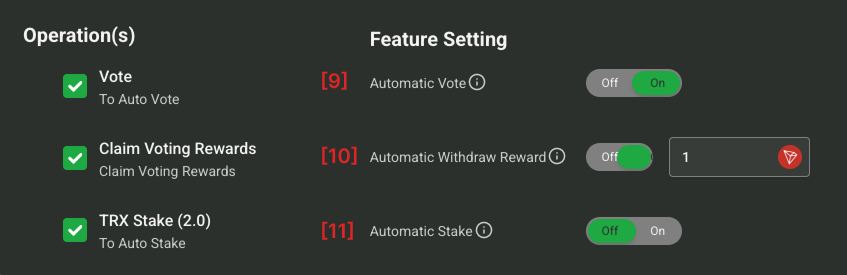 | # | 设置项 | 说明 |
| -- | --------------------------- | --------------------------------------- |
| 9 | `Automatic Vote` | 自动为超级代表投票以赚取投票奖励。 |
| 10 | `Automatic Withdraw Reward` | 自动领取并提取你的投票奖励。 |
| 11 | `Automatic Stake` | 当你的余额达到设定的阈值时自动质押。系统会运行质押 2.0 交易为你获取能量。 |
| # | 设置项 | 说明 |
| -- | --------------------------- | --------------------------------------- |
| 9 | `Automatic Vote` | 自动为超级代表投票以赚取投票奖励。 |
| 10 | `Automatic Withdraw Reward` | 自动领取并提取你的投票奖励。 |
| 11 | `Automatic Stake` | 当你的余额达到设定的阈值时自动质押。系统会运行质押 2.0 交易为你获取能量。 |
 | # | 设置项 | 说明 |
| -- | ------------------- | --------------------------------------------------------------- |
| 12 | `Payment Address` | 接收自动卖出利润的地址。 |
| 13 | `Payment frequency` | 结算的频率。每笔订单履行后\*\*立即\*\*结算(每笔交易手续费 0.3 TRX),或\*\*每日\*\*结算(零手续费)。 |
## 后续步骤
* 了解机制:[质押 2.0](/chinese/concepts/staking-2.0.md) · [订单类型](/chinese/concepts/order-types.md) · [定价与 APY](/chinese/concepts/pricing-and-apy.md)
* 获取可卖出的资源:[通过质押 2.0 获取能量](/chinese/guides/sell/staking-2.0.md)
| # | 设置项 | 说明 |
| -- | ------------------- | --------------------------------------------------------------- |
| 12 | `Payment Address` | 接收自动卖出利润的地址。 |
| 13 | `Payment frequency` | 结算的频率。每笔订单履行后\*\*立即\*\*结算(每笔交易手续费 0.3 TRX),或\*\*每日\*\*结算(零手续费)。 |
## 后续步骤
* 了解机制:[质押 2.0](/chinese/concepts/staking-2.0.md) · [订单类型](/chinese/concepts/order-types.md) · [定价与 APY](/chinese/concepts/pricing-and-apy.md)
* 获取可卖出的资源:[通过质押 2.0 获取能量](/chinese/guides/sell/staking-2.0.md)