> For the complete documentation index, see [llms.txt](https://docs.tronsave.io/llms.txt). Markdown versions of documentation pages are available by appending `.md` to page URLs; this page is available as [Markdown](https://docs.tronsave.io/chinese/guides/sell/permission.md).
# 权限
授予 TronSave 作为供应商代理资源并赚取收益所需的权限——可在应用内自动设置,也可在 TronScan/TronLink 中手动设置。
作为**供应商**,你质押 TRX,获得[能量或带宽](/chinese/concepts/energy-and-bandwidth.md),并让 TronSave 将该资源代理给买家,从而赚取高达 **25% APY** 的收益。成为供应商需要至少质押 **5,000 TRX**。
为了让 TronSave 代你管理代理(委托)、质押、投票和奖励提取,你必须使用 TRON 多重签名在你的账户上授予它一项**活跃权限(active permission)**。你可以在 TronSave 内自动完成此操作,也可以在 TronScan / TronLink 中手动完成。
{% hint style="info" %}
TronSave 始终只接收**活跃权限**(而非所有者权限)。它只能执行你在下方授权的特定操作——它无法转移你账户的所有权。
{% endhint %}
## 1. 自动授权(在 TronSave 中)
最快捷的方式。TronSave 会为你构建权限交易。
1. 打开 [tronsave.io/dashboard/seller](https://tronsave.io/dashboard/seller) 中的 **Seller** 标签页,然后点击 **Login TRONSAVE**。
2. 选择 **Settings**,然后点击 **Register**。
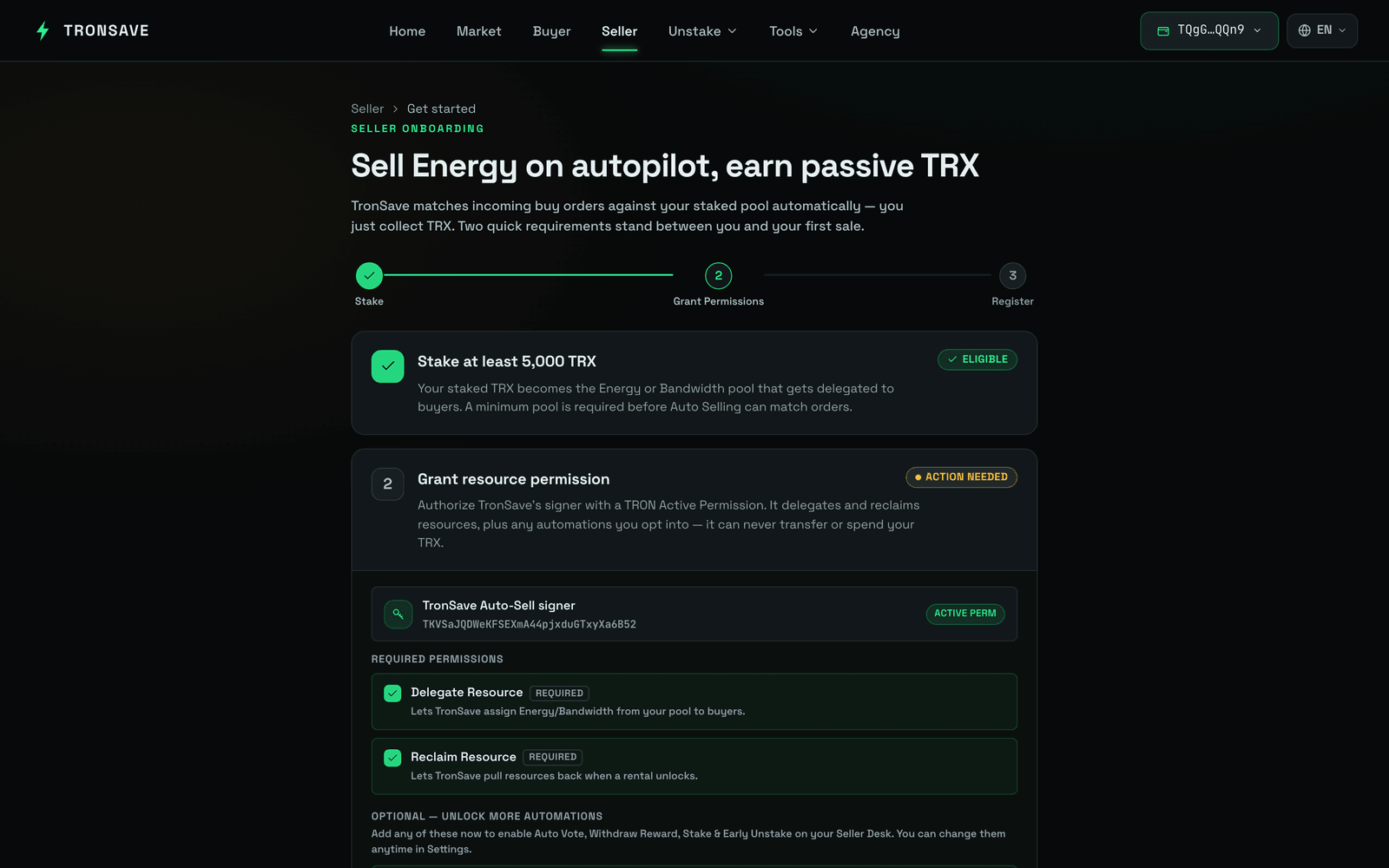 3. 根据你的偏好为资金池选择权限,然后点击 **Give Permission**。
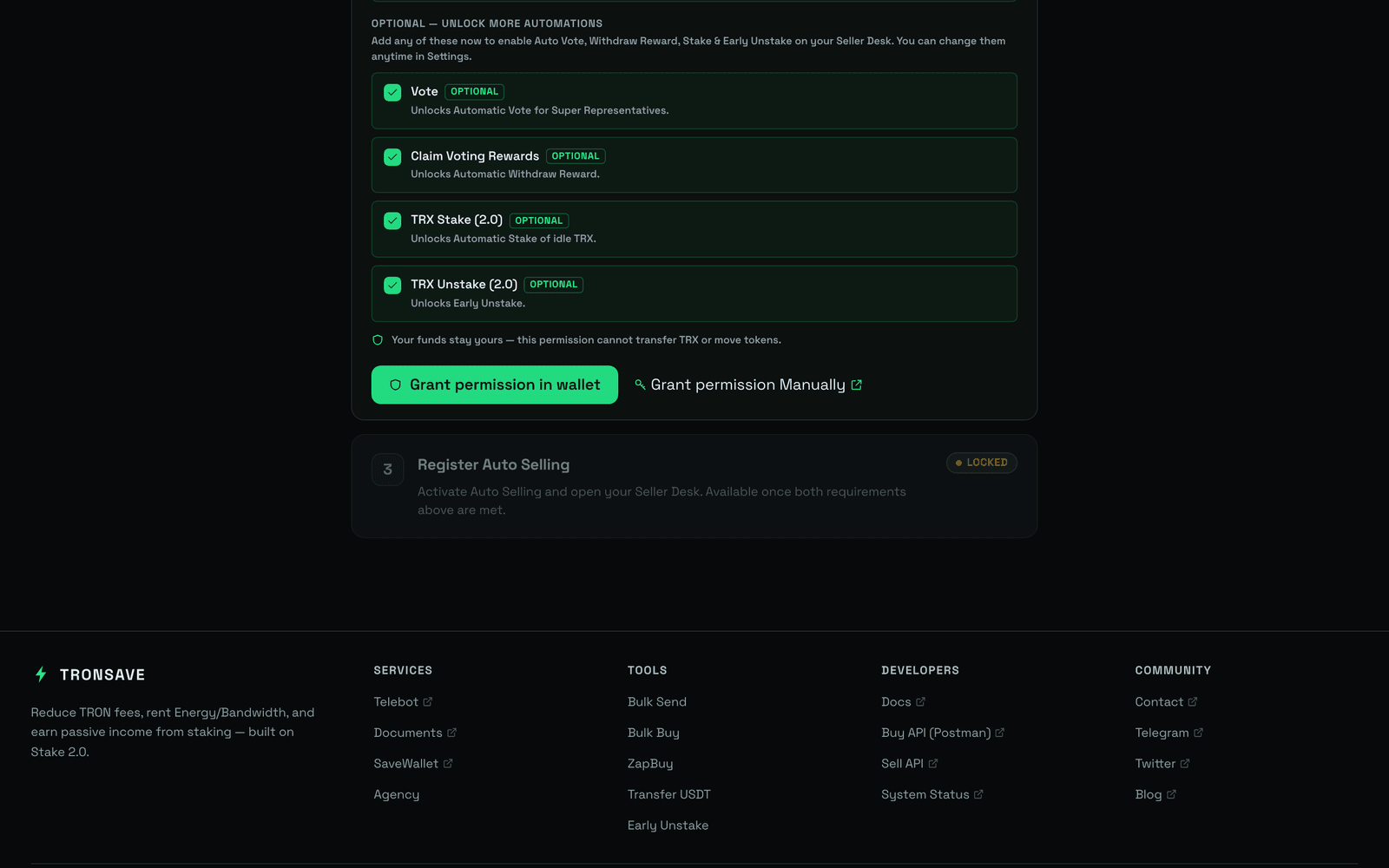 ## 2. 手动授权(在 TronScan / TronLink 中)
如果你更希望自行配置活跃权限,请添加以下操作并将它们分配给 TronSave 地址。
### 需要授予的操作
* *Resources Delegate*
* *Resource Reclaim*
* *TRX Stake 2.0*
* *TRX Unstake 2.0*
* *Vote*
* *Reward Withdraw*
### TronSave 地址
在新建活跃权限的 **Keys** 框中添加此地址:
```
TXUwRhntqX3kyALhtpC74JP8Nt6m2VMiYC
```
{% tabs %}
{% tab title="PC (TronScan)" %}
1. 打开 。
2. 连接你的钱包。
3. 在 **Owner Access** 部分点击 **Edit Permission**。
4. 在 **Active Permission** 部分点击 **+ Add active permission**。
5. 在 **Add Active Permission** 弹窗中,在 **Permission Name** 处填写任意名称(例如 `Tronsave`)。点击 **+ Add** 操作按钮,并选择[上面列出的](#operations-to-grant)六项操作。
6. 点击 **Save**。在 **Threshold** 框中输入 `1`。在 **Weight** 框中输入 `1`,并在 **Keys** 框中填入 TronSave 地址 `TXUwRhntqX3kyALhtpC74JP8Nt6m2VMiYC`。
7. 点击 **Save**。**Add active permission** 弹窗关闭。
8. 在 **Owner Permission** 部分点击 **Save**,完成多重签名流程。
## 2. 手动授权(在 TronScan / TronLink 中)
如果你更希望自行配置活跃权限,请添加以下操作并将它们分配给 TronSave 地址。
### 需要授予的操作
* *Resources Delegate*
* *Resource Reclaim*
* *TRX Stake 2.0*
* *TRX Unstake 2.0*
* *Vote*
* *Reward Withdraw*
### TronSave 地址
在新建活跃权限的 **Keys** 框中添加此地址:
```
TXUwRhntqX3kyALhtpC74JP8Nt6m2VMiYC
```
{% tabs %}
{% tab title="PC (TronScan)" %}
1. 打开 。
2. 连接你的钱包。
3. 在 **Owner Access** 部分点击 **Edit Permission**。
4. 在 **Active Permission** 部分点击 **+ Add active permission**。
5. 在 **Add Active Permission** 弹窗中,在 **Permission Name** 处填写任意名称(例如 `Tronsave`)。点击 **+ Add** 操作按钮,并选择[上面列出的](#operations-to-grant)六项操作。
6. 点击 **Save**。在 **Threshold** 框中输入 `1`。在 **Weight** 框中输入 `1`,并在 **Keys** 框中填入 TronSave 地址 `TXUwRhntqX3kyALhtpC74JP8Nt6m2VMiYC`。
7. 点击 **Save**。**Add active permission** 弹窗关闭。
8. 在 **Owner Permission** 部分点击 **Save**,完成多重签名流程。
 {% endtab %}
{% tab title="Mobile (TronLink)" %}
1. 登录你的 TronLink 应用。
2. 点击右下角的 **Me**。
3. 点击 **Public Account Management**,然后点击 **Permission**。
4. 点击 **Add Permissions**。
5. 在 **Permission Name** 处填写任意名称(例如 `Tronsave`)。
6. 在 **Operations** 部分,点击钢笔图标并选择[上面列出的](#operations-to-grant)六项操作。
7. 点击 **Confirm**。在 **Threshold** 框中输入 `1`。在 **Weight** 框中输入 `1`,并在 **Keys** 框中填入 TronSave 地址 `TXUwRhntqX3kyALhtpC74JP8Nt6m2VMiYC`。
8. 点击 **Confirm**。
 
{% endtab %}
{% endtabs %}
## 后续步骤
* [出售 / 供应商指南](/chinese/guides/sell.md) · [质押 2.0](/chinese/concepts/staking-2.0.md) · [定价与 APY](/chinese/concepts/pricing-and-apy.md)
{% endtab %}
{% tab title="Mobile (TronLink)" %}
1. 登录你的 TronLink 应用。
2. 点击右下角的 **Me**。
3. 点击 **Public Account Management**,然后点击 **Permission**。
4. 点击 **Add Permissions**。
5. 在 **Permission Name** 处填写任意名称(例如 `Tronsave`)。
6. 在 **Operations** 部分,点击钢笔图标并选择[上面列出的](#operations-to-grant)六项操作。
7. 点击 **Confirm**。在 **Threshold** 框中输入 `1`。在 **Weight** 框中输入 `1`,并在 **Keys** 框中填入 TronSave 地址 `TXUwRhntqX3kyALhtpC74JP8Nt6m2VMiYC`。
8. 点击 **Confirm**。
 
{% endtab %}
{% endtabs %}
## 后续步骤
* [出售 / 供应商指南](/chinese/guides/sell.md) · [质押 2.0](/chinese/concepts/staking-2.0.md) · [定价与 APY](/chinese/concepts/pricing-and-apy.md)