> For the complete documentation index, see [llms.txt](https://docs.tronsave.io/llms.txt). Markdown versions of documentation pages are available by appending `.md` to page URLs; this page is available as [Markdown](https://docs.tronsave.io/chinese/guides/sell/sell-suggestion.md).

# 出售建议

**卖出建议**功能让能量供应商能够自动接收与真实买家需求匹配的卖出建议。你可以定义**自定义筛选条件**，从而只接收你真正想要成交的订单的建议。

这有助于供应商：

* 优化闲置能量资源的利用
* 快速捕捉市场机会
* 提升能量租赁的投资回报
* 节省市场监控的时间

{% hint style="info" %}
筛选通知目前仅适用于**能量**订单。
{% endhint %}

## 前提条件

请先连接你的 TRON 钱包（参见[快速开始](/chinese/getting-started/quickstart.md)）。连接后，应用会为卖家显示专属的管理界面。

## 第 1 步：设置你的 Telegram

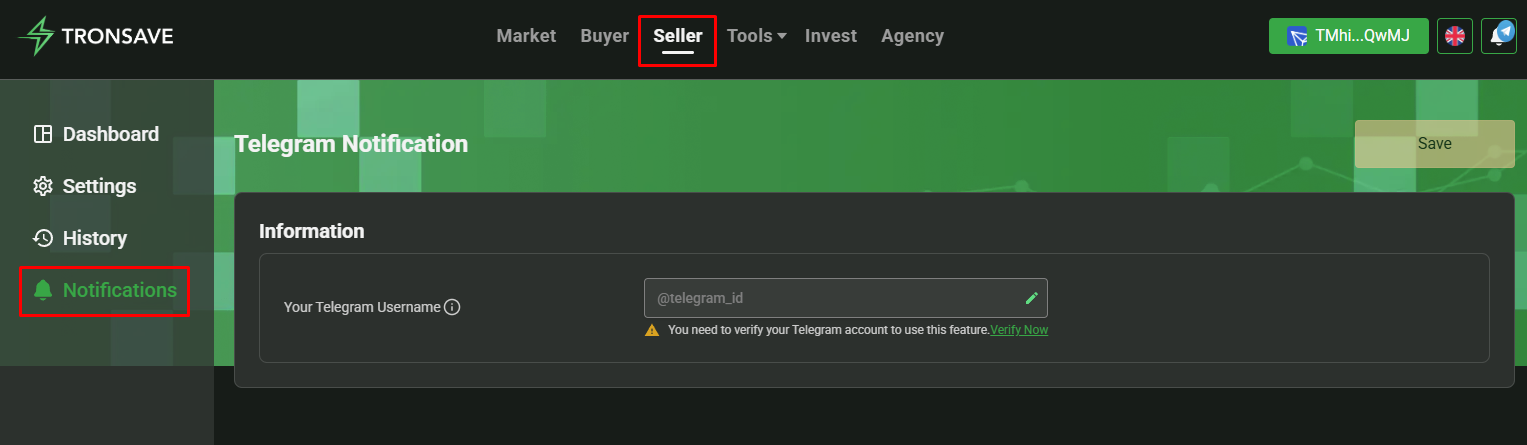
进入 **SELLER**（卖家）板块并打开 **NOTIFICATIONS**（通知）选项卡。

<figure><img src="https://1055070949-files.gitbook.io/~/files/v0/b/gitbook-x-prod.appspot.com/o/spaces%2Fh0rlDWTk05Qu3lvB5Gve%2Fuploads%2F1G7p5KBpOUPjLvZ8GpfQ%2Fimage.png?alt=media&#x26;token=3742f35d-3dcb-4835-b780-49897b1d8486" alt=""><figcaption></figcaption></figure>

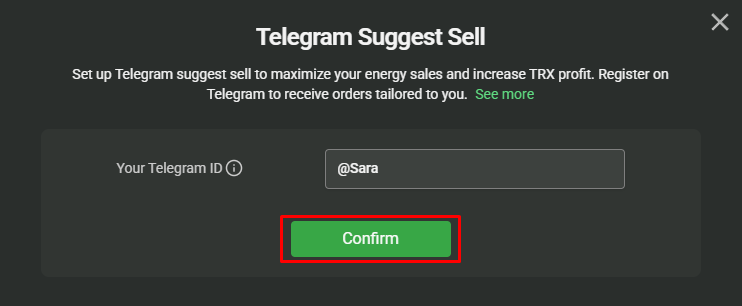
在提供的输入框中填写你的 Telegram ID，然后点击 **CONFIRM**（确认）。

<figure><img src="https://1055070949-files.gitbook.io/~/files/v0/b/gitbook-x-prod.appspot.com/o/spaces%2Fh0rlDWTk05Qu3lvB5Gve%2Fuploads%2FifvvZvQAjFkBEa2cSl5z%2Fimage.png?alt=media&#x26;token=2d26d3d9-b82c-40fd-8dff-dacccd3cf2b2" alt=""><figcaption></figcaption></figure>

<figure><img src="https://1055070949-files.gitbook.io/~/files/v0/b/gitbook-x-prod.appspot.com/o/spaces%2Fh0rlDWTk05Qu3lvB5Gve%2Fuploads%2Fg1iaRIOgbqSMEU5V79LT%2Fimage.png?alt=media&#x26;token=f7b4a469-7168-42cd-aa41-41743d5856c5" alt=""><figcaption></figcaption></figure>

## 第 2 步：验证你的 Telegram

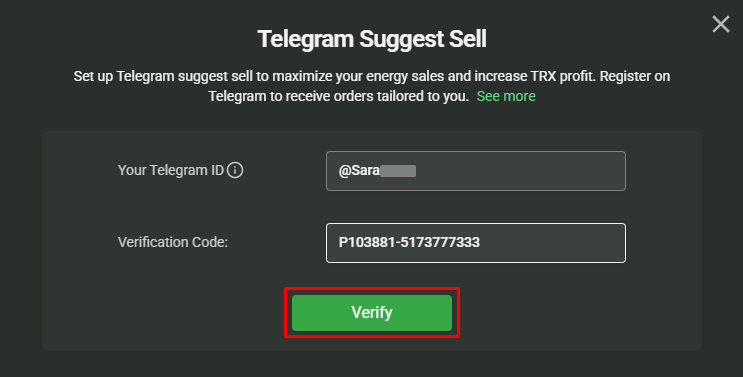
点击 **GET CODE**（获取验证码）开始验证。

<figure><img src="https://1055070949-files.gitbook.io/~/files/v0/b/gitbook-x-prod.appspot.com/o/spaces%2Fh0rlDWTk05Qu3lvB5Gve%2Fuploads%2FyRIxiZfN3DSVSVKNGqW5%2Fimage.png?alt=media&#x26;token=5fe333c2-91eb-4d1a-b6bc-d0db5fc0aa8b" alt=""><figcaption></figcaption></figure>

会出现一个指向 TronSave Telegram 机器人的链接。点击它打开 Telegram。

<figure><img src="https://1055070949-files.gitbook.io/~/files/v0/b/gitbook-x-prod.appspot.com/o/spaces%2Fh0rlDWTk05Qu3lvB5Gve%2Fuploads%2FoMydx7BgDM27fJnrnWD8%2Fanh5.webp?alt=media&#x26;token=9b892919-5f4d-4416-8a7a-582ea28964da" alt=""><figcaption></figcaption></figure>

点击 **Click here to verify**（点击此处验证），将自动跳转到验证页面；或者复制 `CODE` 并手动输入。

<figure><img src="https://1055070949-files.gitbook.io/~/files/v0/b/gitbook-x-prod.appspot.com/o/spaces%2Fh0rlDWTk05Qu3lvB5Gve%2Fuploads%2FELFHFRmCXN48oAkiboSz%2Fimage.png?alt=media&#x26;token=5978cdb7-ea8d-42a9-b191-bdd4b41b52fc" alt=""><figcaption></figcaption></figure>

## 第 3 步：设置筛选通知（仅限能量）

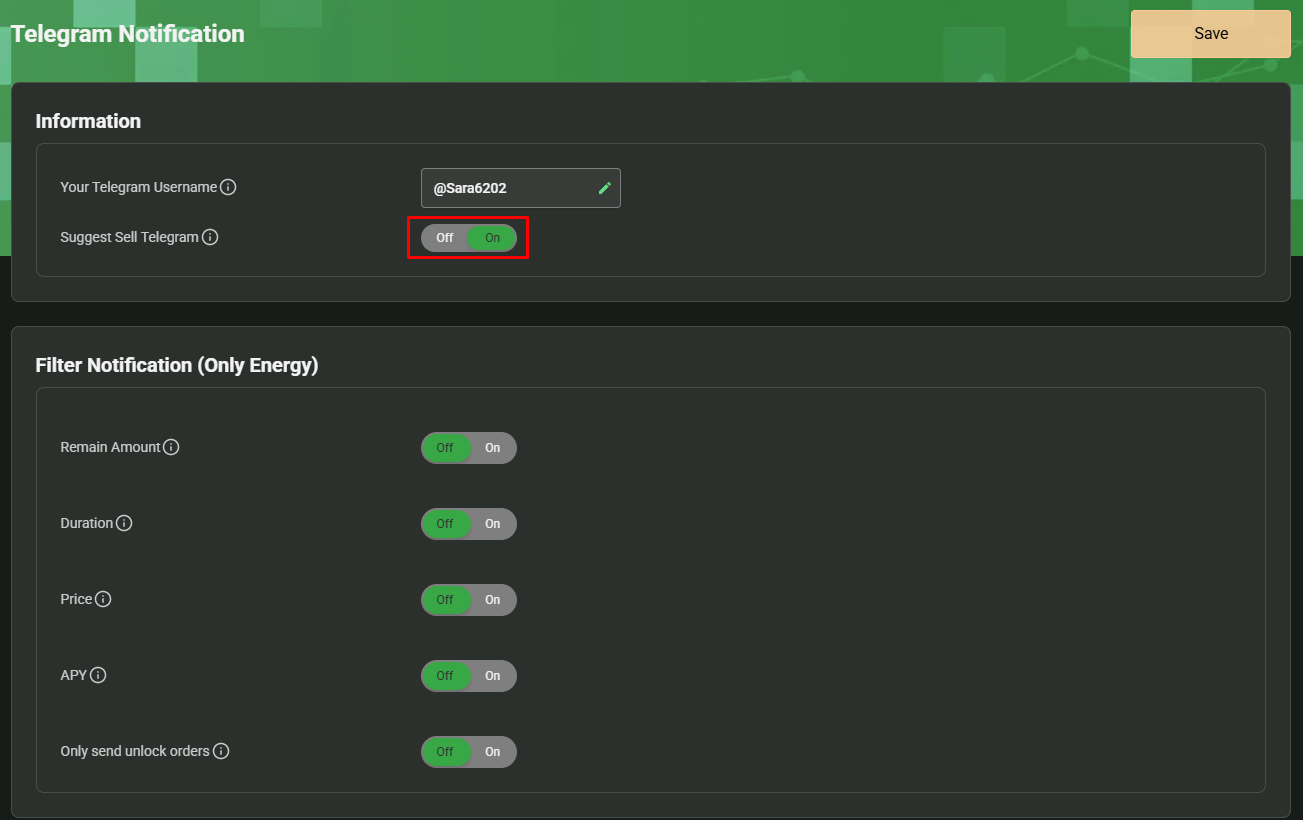
验证完成后，将 Suggest Sell Telegram（Telegram 卖出建议）功能切换为 **ON**（开启），即可显示可配置的筛选条件。

<figure><img src="https://1055070949-files.gitbook.io/~/files/v0/b/gitbook-x-prod.appspot.com/o/spaces%2Fh0rlDWTk05Qu3lvB5Gve%2Fuploads%2Fg45kdQ4HpKXaGUYgnx66%2Fimage.png?alt=media&#x26;token=005bce6a-9f44-487d-9a03-36b77de95b6b" alt=""><figcaption></figcaption></figure>

当你配置筛选条件后，系统只会就满足**所有**已启用条件的订单向你发送通知。任何被切换为 **OFF**（关闭）的条件在评估时都会被忽略。

### 示例

<figure><img src="https://1055070949-files.gitbook.io/~/files/v0/b/gitbook-x-prod.appspot.com/o/spaces%2Fh0rlDWTk05Qu3lvB5Gve%2Fuploads%2FnMgglFLduLhlY86cq8hW%2Fimage.png?alt=media&#x26;token=01030a16-5368-4ca7-ac0b-0cc8442f3450" alt=""><figcaption></figcaption></figure>

| 筛选条件                      | 取值                          |
| ------------------------- | --------------------------- |
| `Remain Amount`           | 从 1,000,000 到 10,000,000 能量 |
| `Duration`                | 从 15 分钟到 1 天                |
| `Price`                   | 从 40 到 100 SUN              |
| `Only send unlock orders` | 已启用                         |

使用上述筛选条件时：

* 系统仅就同时满足**所有**已启用条件的订单发送通知。
* 由于 `APY` 筛选条件已关闭，在筛选时不会被考虑。

## 第 4 步：当订单与你的筛选条件匹配时接收建议

### 对于自动卖出（Auto-Sell）供应商

<figure><img src="https://1055070949-files.gitbook.io/~/files/v0/b/gitbook-x-prod.appspot.com/o/spaces%2Fh0rlDWTk05Qu3lvB5Gve%2Fuploads%2FCexzIdGJr85zfnh5omYG%2Fimage.png?alt=media&#x26;token=005c3a50-fd75-477f-8d45-4d35ffed5eb9" alt=""><figcaption></figcaption></figure>

通知上的按钮对应以下选项：

* **\[ 1 ] Yes, Sell This Order**（是的，卖出此订单）—— 确认为该订单卖出能量。
* **\[ 2 ] Reject**（拒绝）—— 拒绝匹配此订单。

<figure><img src="https://1055070949-files.gitbook.io/~/files/v0/b/gitbook-x-prod.appspot.com/o/spaces%2Fh0rlDWTk05Qu3lvB5Gve%2Fuploads%2FjwqvPCh2WlwPvgB9bdR8%2Fimage.png?alt=media&#x26;token=91073026-b1cd-446b-9487-7eef25662a5a" alt=""><figcaption></figcaption></figure>

<figure><img src="https://1055070949-files.gitbook.io/~/files/v0/b/gitbook-x-prod.appspot.com/o/spaces%2Fh0rlDWTk05Qu3lvB5Gve%2Fuploads%2F5DYnI3Wqh9t6SumGspSi%2Fimage.png?alt=media&#x26;token=7b07549f-56ac-4400-939a-4956f4a84e64" alt=""><figcaption></figcaption></figure>

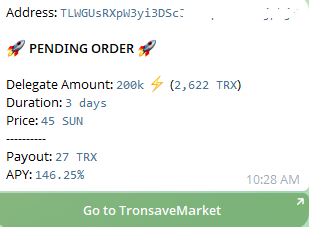
### 对于手动卖家

<figure><img src="https://1055070949-files.gitbook.io/~/files/v0/b/gitbook-x-prod.appspot.com/o/spaces%2Fh0rlDWTk05Qu3lvB5Gve%2Fuploads%2FL4TEaSJrcHhwjoSzuiaA%2Fimage.png?alt=media&#x26;token=75ab26e5-90a7-43e7-b9cf-8d7db61c7b34" alt=""><figcaption></figcaption></figure>

点击 **Go to Tronsave Market**（前往 TronSave 市场），跳转到订单详情页。在那里你可以连接钱包并手动完成卖出。

## 后续步骤

* [通过质押 2.0 获取能量](/chinese/guides/sell/staking-2.0.md) · [价格与 APY](/chinese/concepts/pricing-and-apy.md) · [订单类型](/chinese/concepts/order-types.md)


---

# Agent Instructions
This documentation is published with GitBook. GitBook is the documentation platform designed so that both humans and AI agents can read, navigate, and reason over technical content effectively. Learn more at gitbook.com.

## Querying This Documentation
If you need additional information that is not directly available in this page, you can query the documentation dynamically by asking a question.

Perform an HTTP GET request on the current page URL with the `ask` query parameter, and the optional `goal` query parameter:

```
GET https://docs.tronsave.io/chinese/guides/sell/sell-suggestion.md?ask=<question>&goal=<endgoal>
```

`ask` is the immediate question: it should be specific, self-contained, and written in natural language.
`goal` is optional and describes the broader end goal you are ultimately trying to accomplish on behalf of the user. GitBook uses it to tailor the answer towards what is most useful for that goal.

The response will contain a direct answer to the question and relevant excerpts and sources from the documentation.

Use this mechanism when the answer is not explicitly present in the current page, you need clarification or additional context, or you want to retrieve related documentation sections.