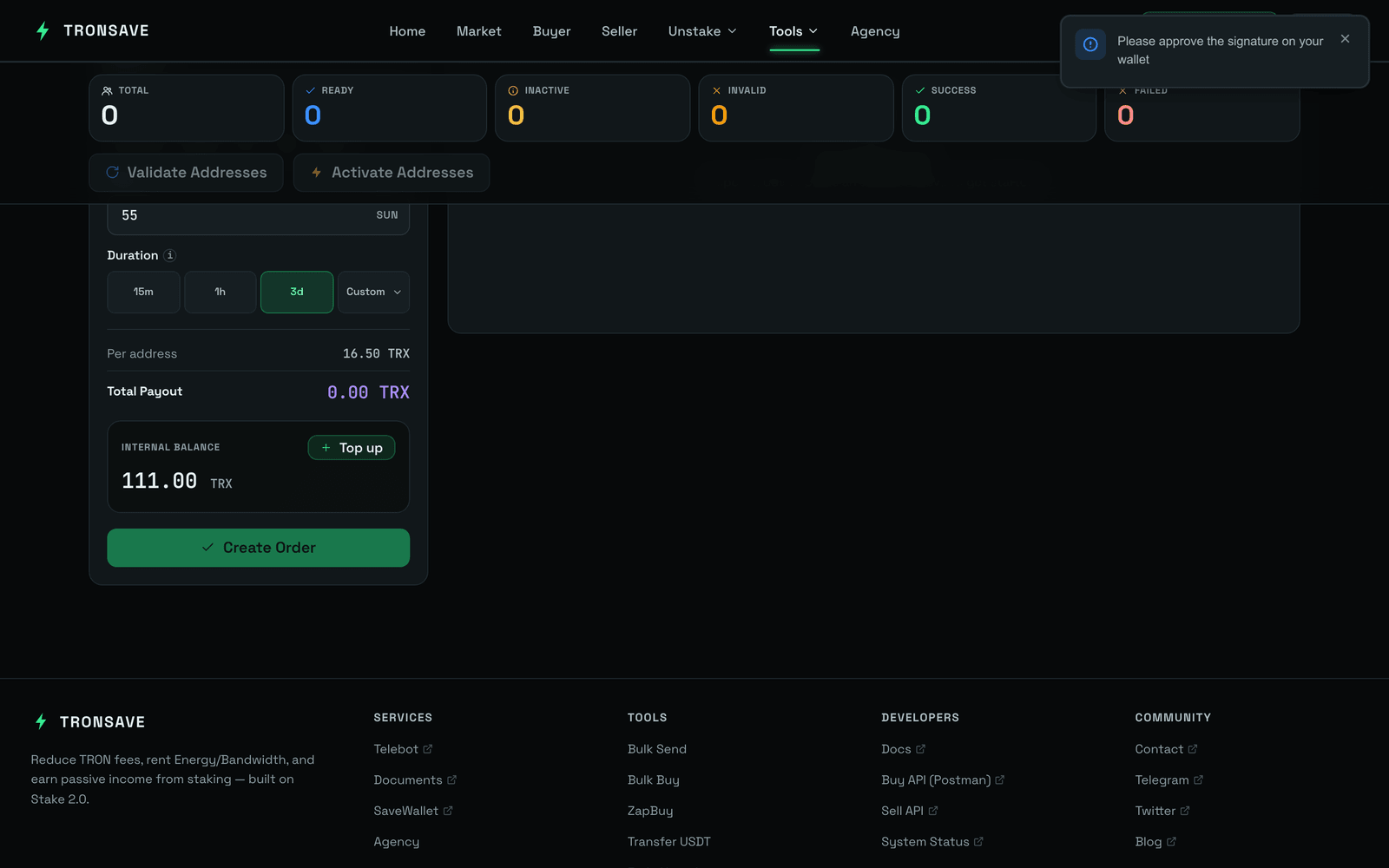
> For the complete documentation index, see [llms.txt](https://docs.tronsave.io/llms.txt). Markdown versions of documentation pages are available by appending `.md` to page URLs; this page is available as [Markdown](https://docs.tronsave.io/chinese/guides/tools/bulk-buy-resource.md).

# 批量购买资源

批量购买资源可一次性为多个账户购买资源。无需为每个钱包重复购买流程，你只需上传一份地址列表，设置统一的数量和时长，TronSave 就会将能量直接代理(委托)给每一个地址。

它专为管理大量钱包的用户而设计——无论是机器人、用户账户还是分发场景——在这些场景下逐个地址购买并不现实。

## 适用场景

* 一次性为**多个地址**购买能量，而无需为每个钱包手动重复流程。
* 在单个界面中管理大量账户、机器人或用户钱包。
* 能量直接发送到每个地址——无需为每个钱包逐一签名。

{% hint style="info" %}
本工具是对标准订单流程的补充。对于日常的单地址购买，请参阅[购买能量与带宽](/chinese/guides/buy.md)。
{% endhint %}

## 如何为多个地址购买能量

### 第 1 步 — 打开工具

前往 [tronsave.io](https://tronsave.io/)，打开 **Tools(工具)** 菜单，点击 [**Bulk Buy Resource(批量购买资源)**](https://tronsave.io/tools/multi-buy)。

### 第 2 步 — 连接钱包并为内部账户充值

确保你的 TronSave 内部账户有足够余额来支付批量订单。有关设置和充值说明，请参阅[获取 API 密钥](/chinese/developers/quickstart.md)。

### 第 3 步 — 导入 CSV 文件

上传一份包含钱包地址的 CSV 文件，每行一个地址。

<figure><img src="/files/RrGxsaKTf6UfZCRpRanW" alt="Tools Bulk Buy"><figcaption></figcaption></figure>

### 第 4 步 — 设置数量和时长

* 选择**数量** `[1]` 和**时长** `[2]`。
* 然后**获取 API 密钥** `[3]`。

<figure><img src="https://1055070949-files.gitbook.io/~/files/v0/b/gitbook-x-prod.appspot.com/o/spaces%2Fh0rlDWTk05Qu3lvB5Gve%2Fuploads%2FidxLFT7v5ohs7eHLdr4a%2Fimage.png?alt=media&#x26;token=0e62d050-89e2-4412-998d-27d909a7d8f6" alt=""><figcaption></figcaption></figure>

### 第 5 步 — 检查并激活

查看所有地址的状态。如果有任何钱包未激活，你可以直接在此界面进行激活。

<figure><img src="https://1055070949-files.gitbook.io/~/files/v0/b/gitbook-x-prod.appspot.com/o/spaces%2Fh0rlDWTk05Qu3lvB5Gve%2Fuploads%2F8xK870Dt7bRysoIrEvsJ%2Fimage.png?alt=media&#x26;token=a124cfa5-e9e1-4732-82f2-858531999868" alt=""><figcaption></figcaption></figure>

<figure><img src="https://1055070949-files.gitbook.io/~/files/v0/b/gitbook-x-prod.appspot.com/o/spaces%2Fh0rlDWTk05Qu3lvB5Gve%2Fuploads%2FsTIkZaZxkxhfH0IoJRn9%2Fimage.png?alt=media&#x26;token=2b40074d-1684-41c0-ab7c-bbfab66cbb0d" alt=""><figcaption></figcaption></figure>

### 第 6 步 — 购买能量

* 当每个地址都显示\*\*Ready(就绪)**状态后，点击**Confirm(确认)\*\*以继续完成能量购买。

<figure><img src="https://1055070949-files.gitbook.io/~/files/v0/b/gitbook-x-prod.appspot.com/o/spaces%2Fh0rlDWTk05Qu3lvB5Gve%2Fuploads%2FNn5Ya36rDEIcXBFMEqOI%2Fimage.png?alt=media&#x26;token=6220369b-6be0-4de3-9d2c-d7e179c1db02" alt=""><figcaption></figcaption></figure>

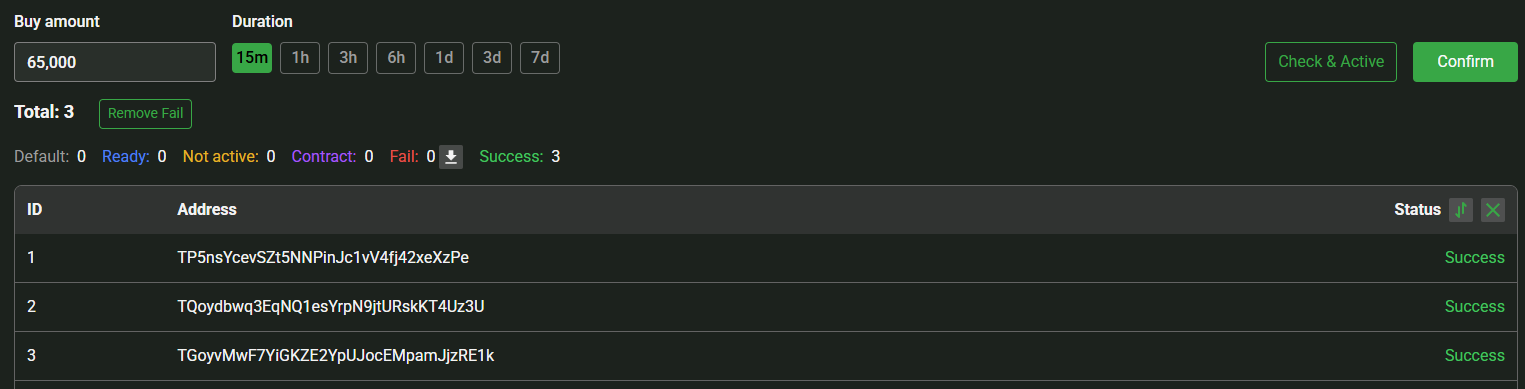
* \*\*Success(成功)\*\*状态表示订单已成功创建。你可以在 Tronscan 上核实交易详情以进行确认。
<figure><img src="https://1055070949-files.gitbook.io/~/files/v0/b/gitbook-x-prod.appspot.com/o/spaces%2Fh0rlDWTk05Qu3lvB5Gve%2Fuploads%2FK6xWejsOfS9xvzNt7xxY%2Fimage.png?alt=media&#x26;token=f6203cc2-a1ef-427f-bf17-b3a35b0db178" alt=""><figcaption></figcaption></figure>

## 后续步骤

* [批量发送代币](/chinese/guides/tools/bulk-send-token.md) — 通过 CSV 向多个接收方分发 TRX 和 TRC20 代币。
* [转账 USDT](/chinese/guides/tools/transfer-usdt.md) — 成本优化的 USDT 转账。
* [购买能量与带宽](/chinese/guides/buy.md) · [能量与带宽](/chinese/concepts/energy-and-bandwidth.md)


---

# Agent Instructions
This documentation is published with GitBook. GitBook is the documentation platform designed so that both humans and AI agents can read, navigate, and reason over technical content effectively. Learn more at gitbook.com.

## Querying This Documentation
If you need additional information that is not directly available in this page, you can query the documentation dynamically by asking a question.

Perform an HTTP GET request on the current page URL with the `ask` query parameter, and the optional `goal` query parameter:

```
GET https://docs.tronsave.io/chinese/guides/tools/bulk-buy-resource.md?ask=<question>&goal=<endgoal>
```

`ask` is the immediate question: it should be specific, self-contained, and written in natural language.
`goal` is optional and describes the broader end goal you are ultimately trying to accomplish on behalf of the user. GitBook uses it to tailor the answer towards what is most useful for that goal.

The response will contain a direct answer to the question and relevant excerpts and sources from the documentation.

Use this mechanism when the answer is not explicitly present in the current page, you need clarification or additional context, or you want to retrieve related documentation sections.