> For the complete documentation index, see [llms.txt](https://docs.tronsave.io/llms.txt). Markdown versions of documentation pages are available by appending `.md` to page URLs; this page is available as [Markdown](https://docs.tronsave.io/guides/buy/on-telegram/buy-on-telegram.md).

# Buy on Telegram

There are two ways to buy Resources with your TronSave internal account in the Telegram bot: create a **Pending Order** and pay later, or buy directly from your funded internal account.

{% hint style="info" %}
Make sure you have [created a Telegram account](/guides/buy/on-telegram/create-account.md) and [deposited TRX](/guides/buy/on-telegram/deposit-trx.md) before buying. For the difference between order types, see [Order Types](/concepts/order-types.md).
{% endhint %}

## Pending Order — create order, pay later

A Pending Order lets you place the order first and pay afterward by depositing the exact total to the address the bot returns.

### Step 1: Open the bot

Open [@BuyEnergyTronsave\_bot](https://t.me/BuyEnergyTronsave_bot) in Telegram.

### Step 2: Place the order

Send the buy command in this format:

```
/energy [target-address] [resource-amount] [duration]
/bandwidth [target-address] [resource-amount] [duration]
```

{% hint style="info" %}
Use `/available` to check available Resources and `/calc` to calculate the cost before buying.
{% endhint %}

**Example:**

```
/energy TWkuSK363HQLtRFCBsNeeiSL7EXy5s6dGL 100000 3h   // 100K Energy for 3 hours
/bandwidth TWkuSK363HQLtRFCBsNeeiSL7EXy5s6dGL 2000 1   // 2000 Bandwidth for 1 day
```

**Duration format:**

* Minimum `1h` (1 hour), maximum `30` (30 days).
* For hours: a number followed by `h` (e.g. `1h`, `12h`).
* For days: just the number (e.g. `1`, `20`).

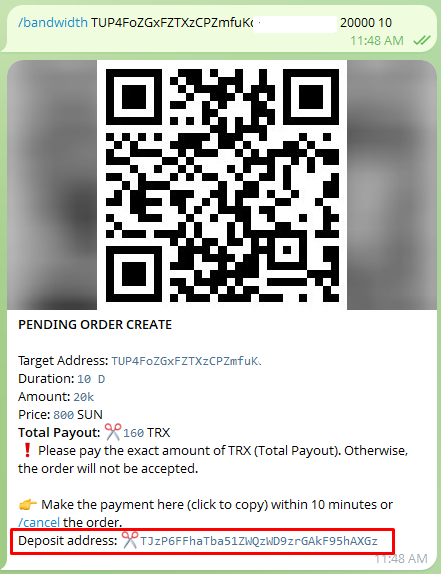
### Step 3: Deposit the total payout

Deposit the exact **Total Payout** to the deposit address provided by the bot.

<figure><img src="https://1055070949-files.gitbook.io/~/files/v0/b/gitbook-x-prod.appspot.com/o/spaces%2Fh0rlDWTk05Qu3lvB5Gve%2Fuploads%2FcwytOcj2yQXg3wmY9m4p%2Fimage.png?alt=media&#x26;token=c4b0b4f9-feb9-4b8b-98e2-9a58d28bbed1" alt=""><figcaption></figcaption></figure>

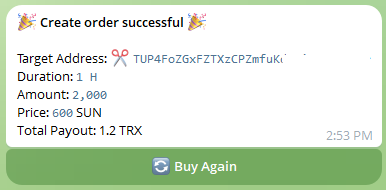
### Step 4: Order created

Once full payment is received within 20 seconds, your order is successfully created.

<figure><img src="https://1055070949-files.gitbook.io/~/files/v0/b/gitbook-x-prod.appspot.com/o/spaces%2Fh0rlDWTk05Qu3lvB5Gve%2Fuploads%2Fvm6CrYmAMOn4dGgFmzdC%2Fimage.png?alt=media&#x26;token=7697bff8-06d7-47ac-b9f8-4c2d10defd42" alt=""><figcaption></figcaption></figure>

## Buy using internal account

Buy directly from your funded internal account, either with **Quick Buy** or **Custom Buy**.

### Quick Buy

**Step 1:** Click the **Buy Resource** button.

<figure><img src="https://1055070949-files.gitbook.io/~/files/v0/b/gitbook-x-prod.appspot.com/o/spaces%2Fh0rlDWTk05Qu3lvB5Gve%2Fuploads%2FZpiLNa2a7D5vV93adg0o%2Fimage.png?alt=media&#x26;token=551763f2-451e-45bf-b81a-27ec3ef2bbf8" alt=""><figcaption></figcaption></figure>

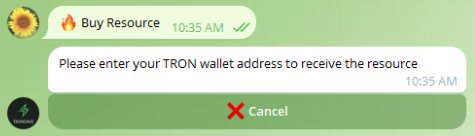
**Step 2:** Enter the TRON wallet address that will receive the Resource.

<figure><img src="https://1055070949-files.gitbook.io/~/files/v0/b/gitbook-x-prod.appspot.com/o/spaces%2Fh0rlDWTk05Qu3lvB5Gve%2Fuploads%2FYQQxSueby1aZ28jq16FC%2Fimage.png?alt=media&#x26;token=eca628a0-323b-4aed-addb-52183feb9414" alt=""><figcaption></figcaption></figure>

**Step 3:** Select **Energy** or **Bandwidth**.

<figure><img src="https://1055070949-files.gitbook.io/~/files/v0/b/gitbook-x-prod.appspot.com/o/spaces%2Fh0rlDWTk05Qu3lvB5Gve%2Fuploads%2FPfakK7PRiemDiaR6WSOC%2Fimage.png?alt=media&#x26;token=edc4428d-12af-48d2-a438-7ca79ffda90b" alt=""><figcaption></figcaption></figure>

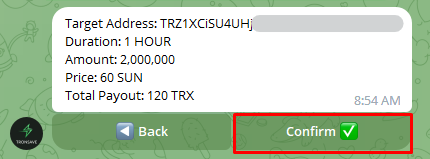
**Step 4:** Fill in the order details:

* Select a **Duration** (e.g. 1 Hour, 3 Days).
* Click the **Amount** you want to buy.

<figure><img src="https://1055070949-files.gitbook.io/~/files/v0/b/gitbook-x-prod.appspot.com/o/spaces%2Fh0rlDWTk05Qu3lvB5Gve%2Fuploads%2FcjEXXyJ7FtRnBfmQSqfW%2Fimage.png?alt=media&#x26;token=000b5d38-f625-4d86-a680-993ac5cd2816" alt=""><figcaption></figcaption></figure>

**Step 5:** Click **Confirm** to create the order.

<figure><img src="https://1055070949-files.gitbook.io/~/files/v0/b/gitbook-x-prod.appspot.com/o/spaces%2Fh0rlDWTk05Qu3lvB5Gve%2Fuploads%2Foi1h9CnKKQNSnGF4U1LD%2Fimage.png?alt=media&#x26;token=c881adfc-ab82-4ddb-8835-64c440cd57f7" alt=""><figcaption></figcaption></figure>

### Custom Buy

There are two ways to start a Custom Buy.

**Option 1:** Click the **Custom Buy** button directly in the buy form. The website interface is integrated into the TronSave Telegram bot.

<figure><img src="https://1055070949-files.gitbook.io/~/files/v0/b/gitbook-x-prod.appspot.com/o/spaces%2Fh0rlDWTk05Qu3lvB5Gve%2Fuploads%2FUgFvrvMUxdgzohZ8uKsE%2Fimage.png?alt=media&#x26;token=5f7af6a3-b516-4e06-8e70-9f81d8be05ed" alt=""><figcaption></figcaption></figure>

<figure><img src="https://1055070949-files.gitbook.io/~/files/v0/b/gitbook-x-prod.appspot.com/o/spaces%2Fh0rlDWTk05Qu3lvB5Gve%2Fuploads%2FQt9x9eNvl2yoVEhn2olo%2Fimage.png?alt=media&#x26;token=7839247c-022b-41e2-a9dd-e1a82849b8f1" alt=""><figcaption></figcaption></figure>

**Option 2:** Select **Buy Energy** to open the pre-integrated custom purchase interface inside the bot.

<figure><img src="https://1055070949-files.gitbook.io/~/files/v0/b/gitbook-x-prod.appspot.com/o/spaces%2Fh0rlDWTk05Qu3lvB5Gve%2Fuploads%2FDvPusqgE3AoE72S94TpF%2Fimage.png?alt=media&#x26;token=a47de1f2-3dd3-4627-861f-513c46d46b08" alt=""><figcaption></figcaption></figure>

<figure><img src="https://1055070949-files.gitbook.io/~/files/v0/b/gitbook-x-prod.appspot.com/o/spaces%2Fh0rlDWTk05Qu3lvB5Gve%2Fuploads%2FQt9x9eNvl2yoVEhn2olo%2Fimage.png?alt=media&#x26;token=7839247c-022b-41e2-a9dd-e1a82849b8f1" alt=""><figcaption></figcaption></figure>

In the custom interface, enter the **Target address**, **Amount**, **Price**, and **Duration**, then click **Create Order** to submit.

## Next steps

* New to the bot? Start with [Create a Telegram account](/guides/buy/on-telegram/create-account.md) and [Deposit TRX](/guides/buy/on-telegram/deposit-trx.md).
* Learn how each order behaves in [Order Types](/concepts/order-types.md).

---

# Agent Instructions
This documentation is published with GitBook. GitBook is the documentation platform designed so that both humans and AI agents can read, navigate, and reason over technical content effectively. Learn more at gitbook.com.

## Querying This Documentation
If you need additional information that is not directly available in this page, you can query the documentation dynamically by asking a question.

Perform an HTTP GET request on the current page URL with the `ask` query parameter, and the optional `goal` query parameter:

```
GET https://docs.tronsave.io/guides/buy/on-telegram/buy-on-telegram.md?ask=<question>&goal=<endgoal>
```

`ask` is the immediate question: it should be specific, self-contained, and written in natural language.
`goal` is optional and describes the broader end goal you are ultimately trying to accomplish on behalf of the user. GitBook uses it to tailor the answer towards what is most useful for that goal.

The response will contain a direct answer to the question and relevant excerpts and sources from the documentation.

Use this mechanism when the answer is not explicitly present in the current page, you need clarification or additional context, or you want to retrieve related documentation sections.