> For the complete documentation index, see [llms.txt](https://docs.tronsave.io/llms.txt). Markdown versions of documentation pages are available by appending `.md` to page URLs; this page is available as [Markdown](https://docs.tronsave.io/guides/buy/on-telegram/deposit-trx.md).
# Deposit TRX
Deposit TRX into your TronSave Telegram bot wallet so you can buy Energy and Bandwidth.
Before you can buy Energy or Bandwidth from the Telegram bot, you need TRX in your bot wallet. This page walks through getting your deposit address and transferring TRX into it.
## Step 1: Get your deposit address
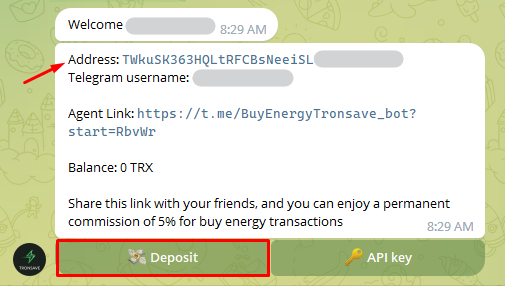
Copy the `Address` shown directly in your **User Info**, or tap the **Deposit** button to display the address along with a QR code.
Click "Deposit"
## Step 2: Transfer TRX
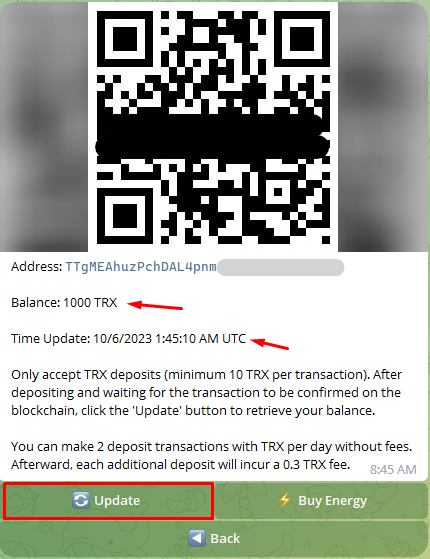
1. Copy the wallet address, or scan the QR code to capture the receiving address.
2. Enter the amount of TRX you want to transfer. The minimum deposit is **10 TRX**.
3. Click **Sign** to confirm the transfer transaction.
{% hint style="info" %}
* Your first deposit requires an additional fee of approximately 1 TRX to activate the new address.
* You can make 2 TRX deposits per day without fees. After that, each additional deposit incurs a 0.3 TRX fee.
{% endhint %}
## Step 3: Wait for confirmation
After the deposit succeeds, click **Update** to refresh the data. The balance and time update automatically and display the latest information.
## Next steps
Once your balance is funded, head to [Buy Energy & Bandwidth](/guides/buy.md) to place your first order.