> For the complete documentation index, see [llms.txt](https://docs.tronsave.io/llms.txt). Markdown versions of documentation pages are available by appending `.md` to page URLs; this page is available as [Markdown](https://docs.tronsave.io/guides/buy/on-the-website/smart-order.md).
# Smart Order
Place a large Energy rental that keeps filling over time as providers regain Energy, with automatic TRX refunds for unused duration.
**Smart Order** is an optional feature for **large** Energy rentals. When the market can't fully match your order at creation time, Smart Order keeps working: it monitors the providers who partially filled your order and auto-matches more Energy as they regain it, refunding any unused duration in TRX.
For the conceptual overview of all order types, see [Order Types](/concepts/order-types.md).
## Requirements
| Field | Minimum |
| ---------- | ----------------- |
| `Amount` | 10,000,000 Energy |
| `Duration` | 3 days |
## How to create a Smart Order
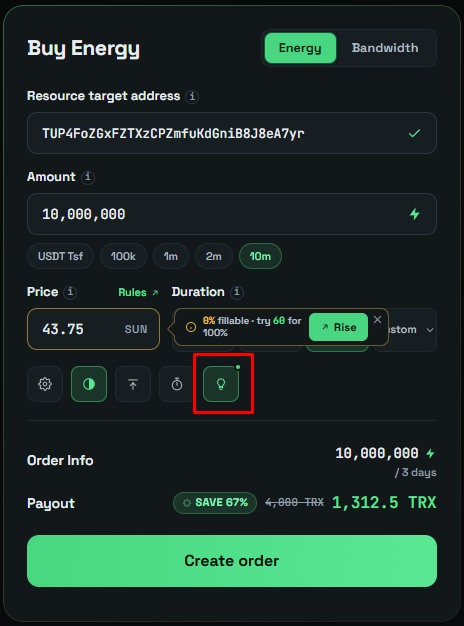
1. **Enter your order details** in the Buy form:
* `Amount`: minimum **10,000,000 Energy**
* `Duration`: minimum **3 days**
2. Suggest **Turn on Smart Matching**
3. Tick the checkbox to enable **Smart Matching**.
## How it works
When Smart Order is enabled:
1. Your order matches normally — the system fills as much as possible from the Energy currently delegated by providers.
2. If the order is **not fully matched**, the system **continues to monitor the providers that have already partially filled it**.
3. If any of those providers **regain at least 100,000 Energy** (through TRX recharge or delegation):
* The system **automatically matches more Energy** from them to your order.
* The **duration** of this additional match runs from the current time until the **original expiration time** of your order.
* You receive a **refund** for the unused duration of the newly matched amount.
{% hint style="info" %}
The actual duration is counted from **now until the unlock time**, so it may be **shorter than** the duration you selected. The missing duration is calculated and **refunded in TRX** automatically.
{% endhint %}
### Example
You place an order for **10,000,000 Energy for 3 days**. Only **9,000,000** is matched initially. One day later, a provider who matched part of your order releases **1,000,000 Energy**.
* The system auto-matches that 1,000,000 for the remaining **2 days**.
* You receive a **refund for 1 day** (the unused portion) on that amount.
## Benefits
* Get the full amount of Energy without manual tracking.
* Make use of providers' **regained Energy** without placing a new order.
* Fair refunds when the matched duration is shorter than requested.
* Higher match success rates for large Energy requests.
## Notes
* Smart Order **does not guarantee** full fulfillment, but improves the chances over time.
* It only works with **providers who have already matched part of your order** and have **regained at least 100,000 Energy**.
* Smart Order is **only active during the first one-third of the matched duration**. For example, if a provider is matched for 3 days, Smart Order auto-matches more Energy only **within the first day**. After that, only regular matching applies.
## Viewing refund details
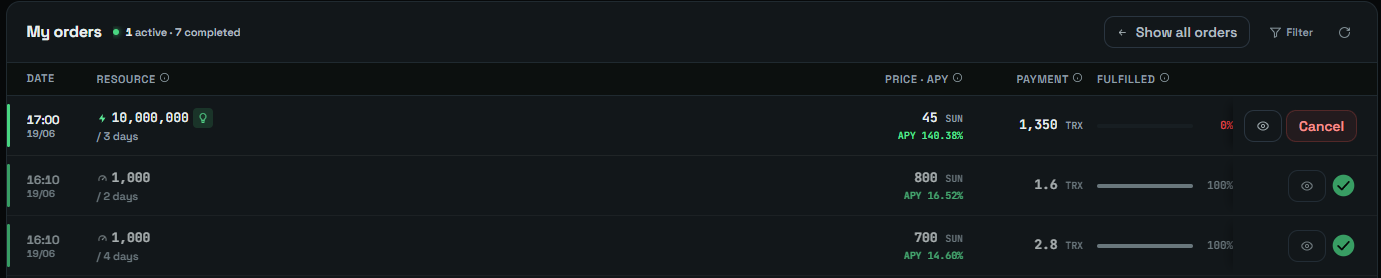
1. Open the **My Order** tab and select the order.
2. Open the **Refund** tab.
## Next steps
* [Normal Order](/guides/buy/on-the-website/normal-order.md) · [Pending Order](/guides/buy/on-the-website/pending-order.md)
* [Order Types](/concepts/order-types.md) · [Energy and Bandwidth](/concepts/energy-and-bandwidth.md)