> For the complete documentation index, see [llms.txt](https://docs.tronsave.io/llms.txt). Markdown versions of documentation pages are available by appending `.md` to page URLs; this page is available as [Markdown](https://docs.tronsave.io/guides/buy/resource-notifications.md).
# Resource Notifications
Get real-time Telegram alerts about your rented resources so orders never lapse and balances never run dry.
**Telegram Notifications** let you receive instant alerts in Telegram about your orders and market opportunities, so you can act in time without constantly checking the platform.
The feature covers both sides of the marketplace:
* **Buyer notifications (this page)** — alerts when a rented resource order is about to be reclaimed, or when your Energy/Bandwidth balance drops below a threshold.
* **Seller notifications** — alerts when a buy order matches your selling conditions (Suggest Sell), helping you sell faster at your preferred price. See the Suggest Sell guide.
**Resource Notifications** are the buyer-side alerts: they tell you when a purchased Energy or Bandwidth order is approaching its reclaim time, or when a balance is running low — so you can extend, repurchase, or top up before service is interrupted.
## Set up Telegram notifications
### Step 1 — Open the Notifications tab
Go to the **BUYER** section and click the **NOTIFICATIONS** tab.
Enter your Telegram ID in the provided field and click **CONFIRM**.
### Step 2 — Verify your Telegram
Click **GET CODE** to start verification.
A link to the TronSave Telegram bot appears — click it to open Telegram.
In the bot, click **Click here to verify** to be redirected to the verification page automatically, or copy the `CODE` and enter it manually.
### Step 3 — Configure your filters
Once verified, turn **ON** Resource Notifications to reveal the available filters.
## Notification types
### Reclaim alert
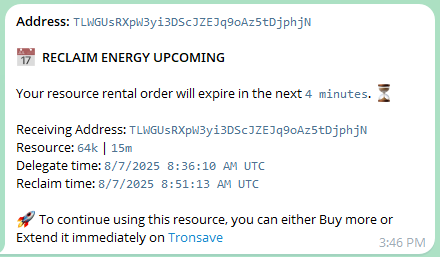
Notifies you when a purchased Energy or Bandwidth order is about to reach its reclaim time, so you can **extend or repurchase** the resource before it is reclaimed and becomes unavailable.
* **Configurable lead time** — choose how early you want the alert (for example, 60 minutes before reclaim).
### Low resource alert
Sends an alert when your Energy or Bandwidth drops below a threshold you define, so you can act before the balance reaches `0` and transactions start failing.
* **Per-resource control** — enable alerts for Energy, Bandwidth, or both.
* **Independent thresholds** — set a different threshold value for each resource type.
{% hint style="info" %}
Reclaim alerts track your active rental orders; low resource alerts track the live Energy/Bandwidth balance on your address. Enable both for full coverage. See [Energy & Bandwidth](/concepts/energy-and-bandwidth.md) for how these resources are consumed.
{% endhint %}
## Next steps
* [Buy Energy & Bandwidth](/guides/buy.md) — place orders that these alerts will track.
* [Order Types](/concepts/order-types.md) — understand reclaim time and rental durations.