> For the complete documentation index, see [llms.txt](https://docs.tronsave.io/llms.txt). Markdown versions of documentation pages are available by appending `.md` to page URLs; this page is available as [Markdown](https://docs.tronsave.io/guides/extend/advance.md).
# Advanced Extend
Fine-grained control for extending and buying more Energy from one or many delegate addresses in a single batch.
**Advance** is the manual extend mode. Instead of a one-click top-up, it lets you select individual delegators, choose exactly how to extend each one, and confirm everything as a single payout. Use it when you want precise control over duration and amount, or when you're extending several delegated blocks at once.
This guide walks through the flow in four steps.
## Step 1 — Open the Extend tab
Connect your wallet to the market first, then scroll down to the **Extend** section and choose the order you want to extend.
## Step 2 — Select the "Advance" option
## Step 3 — Adjust the extend request
The Advance panel can look dense at first. Here is what each part does.
**1. Batch controls.** These apply one choice to every selected request:
* **Using the same settings** — applies the same extend and buy options to all selected extend and buy requests.
* **Same extend only** — applies the same extend option to all selected requests.
* **Same duration** — applies the same duration to all selected requests.
**2. Delegator table.** The table lists every delegator whose delegated resources match the target address. When a delegator is available to extend, its **selection box** is active. Use **All** to select every available delegator at once.
When you select a delegator, the extend options appear. You can choose one of three modes:
### Extend only
Choose an extended duration from 1 to 30 days from now. The chosen duration must be **greater than** the current expiry. For example, if the existing delegation expires in 3 more days, you must choose a duration of 4 to 30 days.
{% hint style="info" %}
**Example**
* **Old delegation:** A delegated 100k to B, expiring in 3 more days.
* You choose to extend the duration to 5 days.
* **New delegation:** A delegated 100k to B, expiring in 5 more days.
{% endhint %}
### Buy more only
If the delegator's remaining Energy is greater than 100k, you can choose an amount to buy on top of the existing delegation.
{% hint style="info" %}
**Example**
* **Old delegation:** A delegated 100k to B, expiring in 3 more days.
* You choose to buy 100k more Energy.
* **New delegation:** A delegated 200k to B, expiring in 3 more days.
{% endhint %}
### Extend and buy
If the delegator's remaining Energy is greater than 100k, you can buy more Energy **and** choose an extended duration from 1 to 30 days from now in the same request.
{% hint style="info" %}
**Example**
* **Old delegation:** A delegated 100k to B, expiring in 3 more days.
* You choose to buy 100k more Energy and extend the duration to 5 days.
* **New delegation:** A delegated 200k to B, expiring in 5 more days.
{% endhint %}
The estimated payout for the selection is shown on the right.
**3. Summary.** Shows the total extended amount across all selected items and the estimated total payout for all requests.
## Step 4 — Confirm and pay out
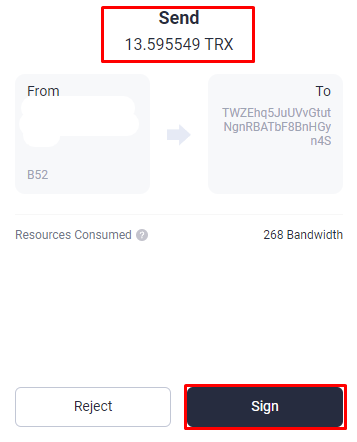
At the **Extend Order Details** stage, TronSave summarizes every extend request with its extended amount and payout. Review it carefully, then click **Extend** to start signing the transfer transaction. The transfer amount must equal the extend payout to send your request.
{% hint style="warning" %}
Make sure the amount of the **transfer transaction** is the same as the amount in the **Payout**.
{% endhint %}
The transferred amount must match the payout shown in Extend Order Confirm
Once you've checked everything, click **Sign transaction**. If the request succeeds, a success pop-up appears, and the flow moves to the **Successfully** stage.
## Next steps
* Prefer a faster top-up? See [Quick Extend](/guides/extend.md).
* New to renting? Start with [How to buy Energy & Bandwidth](/guides/buy.md).