> For the complete documentation index, see [llms.txt](https://docs.tronsave.io/llms.txt). Markdown versions of documentation pages are available by appending `.md` to page URLs; this page is available as [Markdown](https://docs.tronsave.io/guides/extend/quick-extend.md).
# Quick Extend
Top up and prolong an active Energy block in four steps using Quick Extend.
Quick Extend is the fastest way to extend an active Energy block: bump its duration, buy more Energy on top of it, or both. Follow these four steps to do it manually on the market.
## Step 1: Open the Extend tab
First, connect your wallet to the market. See the [Quickstart](/getting-started/quickstart.md) for how to connect a TRON wallet (e.g. TronLink) at [tronsave.io/market](https://tronsave.io/market).
Scroll down to the **Extend** section and choose the order you want to extend.
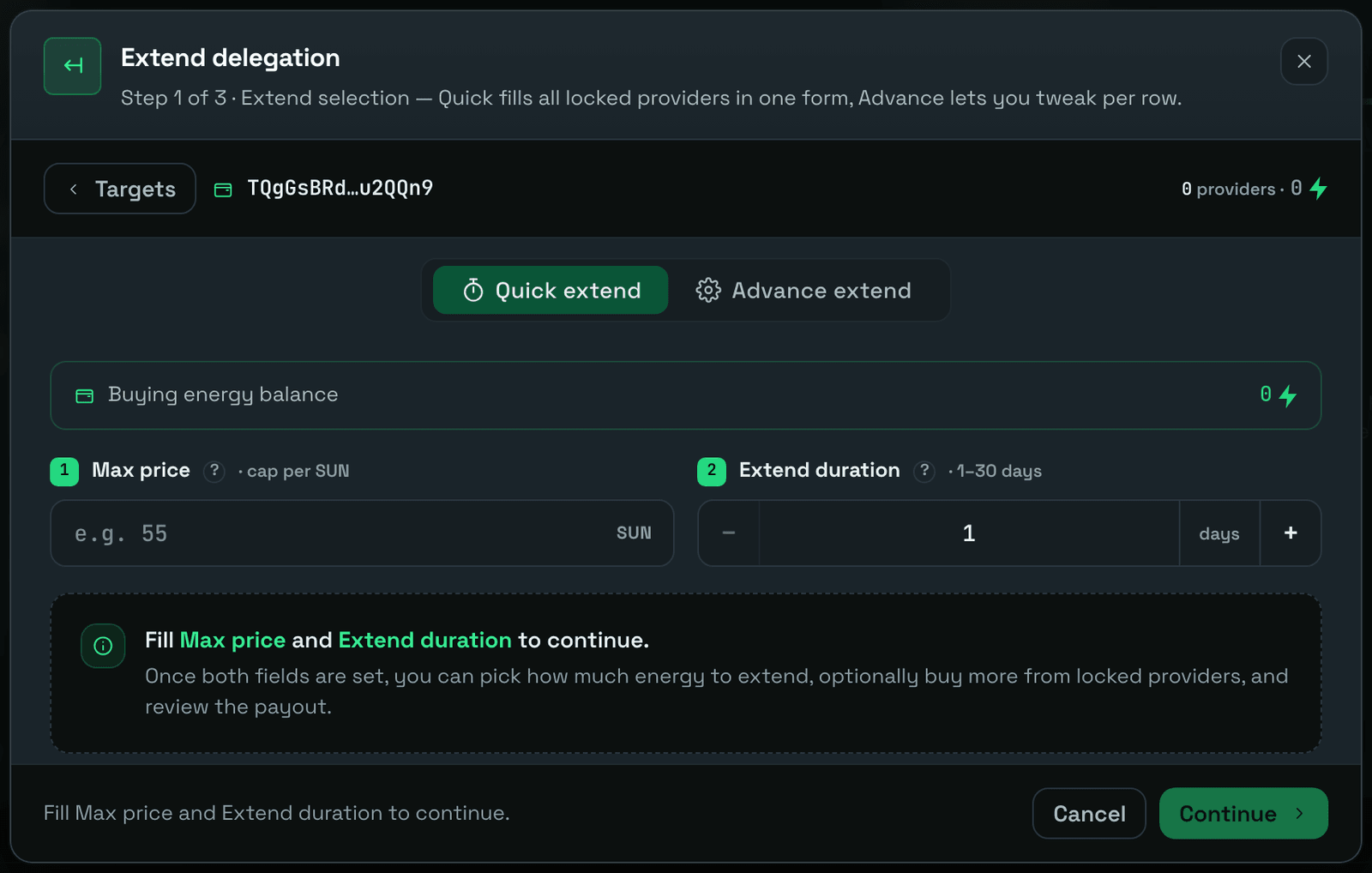
## Step 2: Select the "Quick extend" option
## Step 3: Enter the extend conditions
Enter the desired conditions one by one.
| Field | Description |
| ------------------- | -------------------------------------------------------------------------------------- |
| `Max price` | The maximum price you can pay to extend or buy more orders. |
| `Extend duration` | From the current time + duration = the new expiration time of the order. |
| `Additional amount` | The amount of Energy you want to buy more of. Enter `0` if you don't want to buy more. |
| `Extend amount` | The amount of Energy you will extend. |
If `Additional amount` is `0`, you will only be able to extend the duration. You can choose to extend from 1 day to 30 days from now.
{% hint style="info" %}
**Example — extend duration only**
* **Old delegated:** A delegated 100k Energy to B, expiring in 3 days.
* You choose to extend the duration by 5 days.
* **New delegated:** A delegated 100k Energy to B, expiring in 5 days.
{% endhint %}
If you want to **buy more**, you must **Extend and Buy**. You can choose an additional amount from 100k up to the maximum available from the provider. The minimum extend amount can be selected from the total amount currently delegated by the providers you intend to buy from.
{% hint style="info" %}
**Example — extend and buy more**
* **Old delegated:** A delegated 100k Energy to B, expiring in 3 days.
* You choose to buy 100k more Energy and extend the duration by 5 days.
* **New delegated:** A delegated 200k Energy to B, expiring in 5 days.
{% endhint %}
The market shows a summary of the total extended amount across all selected items and estimates the total payout for all requests.
## Step 4: Confirm and pay out
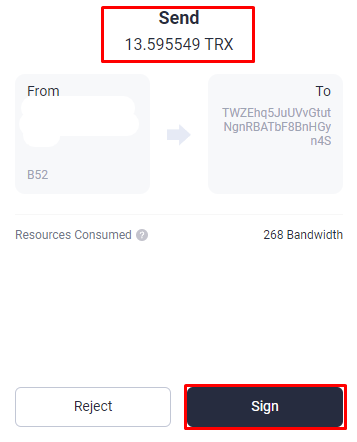
At the **Extend Order Details** stage, the market summarizes all extend requirements with the extended amount and extended payout. Read it carefully, then click **Extend** to start signing the transfer transaction with the same amount as the extend payout, sending your extend request.
{% hint style="warning" %}
Make sure the amount of the transfer transaction matches the amount shown in `Payout`.
{% endhint %}
Make sure the amount transferred is the same as the payout amount in Extend Order Confirm
After checking all the information, click **Sign transaction**.
If everything is correct, the extended request will succeed. A success pop-up appears, and the flow moves to the **Successfully** stage.
## Next steps
* [Extend overview](/guides/extend.md)
* [Buy Energy & Bandwidth](/guides/buy.md)