> For the complete documentation index, see [llms.txt](https://docs.tronsave.io/llms.txt). Markdown versions of documentation pages are available by appending `.md` to page URLs; this page is available as [Markdown](https://docs.tronsave.io/guides/sell/sell-suggestion.md).

# Sell Suggestion

The **Sell Suggestion** feature lets Energy providers automatically receive sell suggestions that match real buyer demand. You define **custom filter conditions** so you only receive suggestions for the orders you actually want to fill.

This helps providers:

* Optimize the use of excess Energy resources
* Capture market opportunities quickly
* Increase return on investment from Energy rentals
* Save time on market monitoring

{% hint style="info" %}
Filter notifications currently apply to **Energy** orders only.
{% endhint %}

## Prerequisites

Connect your TRON wallet first (see [Quickstart](/getting-started/quickstart.md)). Once connected, the app shows a dedicated management interface for the Seller.

## Step 1: Set up your Telegram

Go to the **SELLER** section and open the **NOTIFICATIONS** tab.

<figure><img src="https://1055070949-files.gitbook.io/~/files/v0/b/gitbook-x-prod.appspot.com/o/spaces%2Fh0rlDWTk05Qu3lvB5Gve%2Fuploads%2F1G7p5KBpOUPjLvZ8GpfQ%2Fimage.png?alt=media&#x26;token=3742f35d-3dcb-4835-b780-49897b1d8486" alt=""><figcaption></figcaption></figure>

Enter your Telegram ID in the provided field and click **CONFIRM**.

<figure><img src="https://1055070949-files.gitbook.io/~/files/v0/b/gitbook-x-prod.appspot.com/o/spaces%2Fh0rlDWTk05Qu3lvB5Gve%2Fuploads%2FifvvZvQAjFkBEa2cSl5z%2Fimage.png?alt=media&#x26;token=2d26d3d9-b82c-40fd-8dff-dacccd3cf2b2" alt=""><figcaption></figcaption></figure>

<figure><img src="https://1055070949-files.gitbook.io/~/files/v0/b/gitbook-x-prod.appspot.com/o/spaces%2Fh0rlDWTk05Qu3lvB5Gve%2Fuploads%2Fg1iaRIOgbqSMEU5V79LT%2Fimage.png?alt=media&#x26;token=f7b4a469-7168-42cd-aa41-41743d5856c5" alt=""><figcaption></figcaption></figure>

## Step 2: Verify your Telegram

Click **GET CODE** to start verification.

<figure><img src="https://1055070949-files.gitbook.io/~/files/v0/b/gitbook-x-prod.appspot.com/o/spaces%2Fh0rlDWTk05Qu3lvB5Gve%2Fuploads%2FyRIxiZfN3DSVSVKNGqW5%2Fimage.png?alt=media&#x26;token=5fe333c2-91eb-4d1a-b6bc-d0db5fc0aa8b" alt=""><figcaption></figcaption></figure>

A link to the TronSave Telegram bot appears. Click it to open Telegram.

<figure><img src="https://1055070949-files.gitbook.io/~/files/v0/b/gitbook-x-prod.appspot.com/o/spaces%2Fh0rlDWTk05Qu3lvB5Gve%2Fuploads%2FoMydx7BgDM27fJnrnWD8%2Fanh5.webp?alt=media&#x26;token=9b892919-5f4d-4416-8a7a-582ea28964da" alt=""><figcaption></figcaption></figure>

Click **Click here to verify** to be redirected automatically to the verification page, or copy the `CODE` and enter it manually.

<figure><img src="https://1055070949-files.gitbook.io/~/files/v0/b/gitbook-x-prod.appspot.com/o/spaces%2Fh0rlDWTk05Qu3lvB5Gve%2Fuploads%2FELFHFRmCXN48oAkiboSz%2Fimage.png?alt=media&#x26;token=5978cdb7-ea8d-42a9-b191-bdd4b41b52fc" alt=""><figcaption></figcaption></figure>

## Step 3: Set up Filter Notifications (Energy only)

After verification, turn **ON** the Suggest Sell Telegram feature to reveal the filters you can configure.

<figure><img src="https://1055070949-files.gitbook.io/~/files/v0/b/gitbook-x-prod.appspot.com/o/spaces%2Fh0rlDWTk05Qu3lvB5Gve%2Fuploads%2Fg45kdQ4HpKXaGUYgnx66%2Fimage.png?alt=media&#x26;token=005bce6a-9f44-487d-9a03-36b77de95b6b" alt=""><figcaption></figcaption></figure>

When you configure filter conditions, the system only notifies you about orders that meet **all** enabled conditions. Any condition that is turned **OFF** is ignored during evaluation.

### Example

<figure><img src="https://1055070949-files.gitbook.io/~/files/v0/b/gitbook-x-prod.appspot.com/o/spaces%2Fh0rlDWTk05Qu3lvB5Gve%2Fuploads%2FnMgglFLduLhlY86cq8hW%2Fimage.png?alt=media&#x26;token=01030a16-5368-4ca7-ac0b-0cc8442f3450" alt=""><figcaption></figcaption></figure>

| Filter                    | Value                               |
| ------------------------- | ----------------------------------- |
| `Remain Amount`           | From 1,000,000 to 10,000,000 Energy |
| `Duration`                | From 15 minutes to 1 day            |
| `Price`                   | From 40 to 100 SUN                  |
| `Only send unlock orders` | Enabled                             |

With the filters above:

* The system sends notifications only for orders that meet **all** the enabled conditions at the same time.
* Because the `APY` filter is turned OFF, it is not considered during filtering.

## Step 4: Receive suggestions when an order matches your filter

### For Auto-Sell providers

<figure><img src="https://1055070949-files.gitbook.io/~/files/v0/b/gitbook-x-prod.appspot.com/o/spaces%2Fh0rlDWTk05Qu3lvB5Gve%2Fuploads%2FCexzIdGJr85zfnh5omYG%2Fimage.png?alt=media&#x26;token=005c3a50-fd75-477f-8d45-4d35ffed5eb9" alt=""><figcaption></figcaption></figure>

The buttons on the notification correspond to the following options:

* **\[ 1 ] Yes, Sell This Order** — confirm to sell Energy for this order.
* **\[ 2 ] Reject** — decline to match this order.

<figure><img src="https://1055070949-files.gitbook.io/~/files/v0/b/gitbook-x-prod.appspot.com/o/spaces%2Fh0rlDWTk05Qu3lvB5Gve%2Fuploads%2FjwqvPCh2WlwPvgB9bdR8%2Fimage.png?alt=media&#x26;token=91073026-b1cd-446b-9487-7eef25662a5a" alt=""><figcaption></figcaption></figure>

<figure><img src="https://1055070949-files.gitbook.io/~/files/v0/b/gitbook-x-prod.appspot.com/o/spaces%2Fh0rlDWTk05Qu3lvB5Gve%2Fuploads%2F5DYnI3Wqh9t6SumGspSi%2Fimage.png?alt=media&#x26;token=7b07549f-56ac-4400-939a-4956f4a84e64" alt=""><figcaption></figcaption></figure>

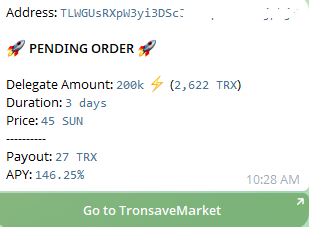
### For manual sellers

<figure><img src="https://1055070949-files.gitbook.io/~/files/v0/b/gitbook-x-prod.appspot.com/o/spaces%2Fh0rlDWTk05Qu3lvB5Gve%2Fuploads%2FL4TEaSJrcHhwjoSzuiaA%2Fimage.png?alt=media&#x26;token=75ab26e5-90a7-43e7-b9cf-8d7db61c7b34" alt=""><figcaption></figcaption></figure>

Click **Go to Tronsave Market** to be redirected to the order details page. There you can connect your wallet and proceed with the sale manually.

## Next steps

* [Get Energy by Staking 2.0](/guides/sell/staking-2.0.md) · [Pricing & APY](/concepts/pricing-and-apy.md) · [Order Types](/concepts/order-types.md)


---

# Agent Instructions
This documentation is published with GitBook. GitBook is the documentation platform designed so that both humans and AI agents can read, navigate, and reason over technical content effectively. Learn more at gitbook.com.

## Querying This Documentation
If you need additional information that is not directly available in this page, you can query the documentation dynamically by asking a question.

Perform an HTTP GET request on the current page URL with the `ask` query parameter:

```
GET https://docs.tronsave.io/guides/sell/sell-suggestion.md?ask=<question>
```

The question should be specific, self-contained, and written in natural language.
The response will contain a direct answer to the question and relevant excerpts and sources from the documentation.

Use this mechanism when the answer is not explicitly present in the current page, you need clarification or additional context, or you want to retrieve related documentation sections.